Backend kommunikatsiya: request-response, push va polling (1-qism)
Assalamu Alaykum bugun backend foydalanuvchi bilan kommunikatsiya qilish usullarini va har bir usul qachon , nima uchun kerakligini bilib olamiz.
Request response (so'rov va javob)
Bu eng oddiy va doim ishlatilinadigan tushunishga oson uslublarda biri .
U qanday ishlaydi ?
Foydalanuvchi ma'lumot olish uchun so'rov jo'natadi .
Server so'rovni (request) tahlil qiladi (qayerda boshlanib tugashini bilish kerak)
Server so'rovni tushunib uni amalga oshiradi.
Server javobni uzatadi.
Foydalanuvchi javobni qabul qiladi va ma'lumotlarni olib ishlatadi.
Tahlil qilish(parsing) bu so'rovni yoki javobni qanday boshlanib tugashini bilish kerak. Bundan tashqari buyerda deserialization va serialization ham bo'ladi. So'rov qaysi metod ekanligini bilish va uni rostdan amalag oshirish 2 xil narsalar.
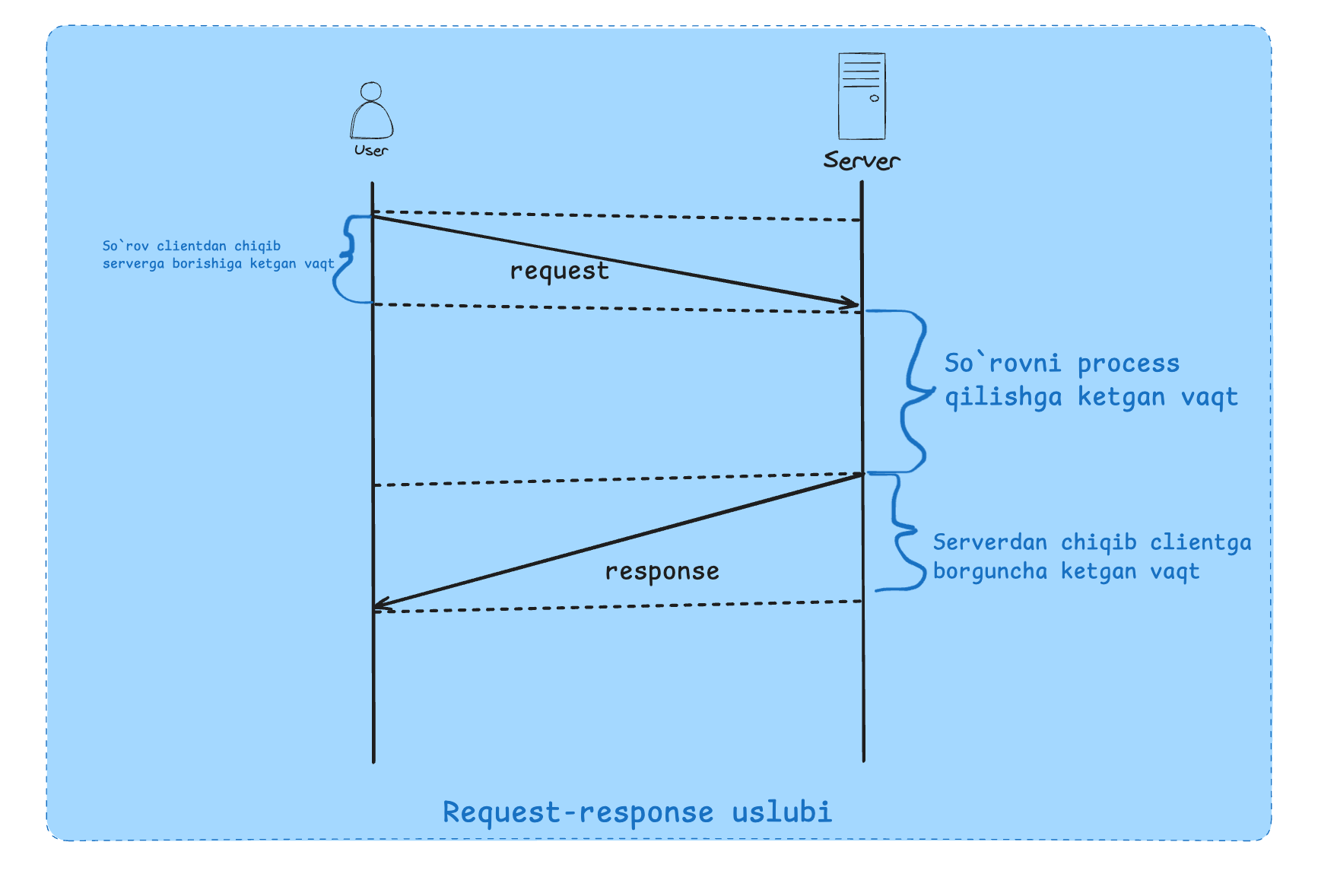
Qayerlarda ishlatilgan ?
Web, HTTp, DNS ip ni ber so'rov , ip kelishi response, SSH, RPC (remote procedure calls) bu so'rovni boshqa kompyuterga jo'natish ammo xuddi sizni kompyuterda ishlayotgandek, SQL databaza protokollari request respons uslubbida ishlaydi. API(REST, SOAP /Graphql) ham shularga kiradi.
Request va Response tuzilishi ?
Request strukturasi foydalanuvchi va server tomonidan protokol uchun kelishilgan paytda aniqlanadi.
GET /(path) HHTP/1.1
HEADERs
<CRLF>
BODY
Example:
POST /login HTTP/1.1
Host: example.com
Content-Type: application/json
Content-Length: 41
{"email":"[email protected]","password":"123"}
Bo'sh qator bu bundan keyingi qism bodyligini bildiradi.
So'rov va javob o'z qoidalari bo'ladi bu protocol tomonidan va xabor formatidan belgilanadi.
Va har bir so'rov backendda process bo'lishidan oldin o'sha tildagi objektga o'tadi bu Javascriptda uncha bilinmaydi.
Muammo hamma joyda ham ishlamaydi.
Notification service (so'rovsiz ma'lumot kelishi)
Chat applicationlarda
Juda ko'p vaqt talab qiladigan so'rovlarda
Foydalanuvchi bilan oradagi aloqa uzilsa.
So'rov birinchi foydalanuvchi tomonda tuzilib va binar formatga serializatsiya bo'lishi kerak uzatilishdan oldin. Bu server tomon uchun ham amal qiladi.
Shu maqola orqali ko'proq bilib olishingiz mumkin.
Network yoki OSI model qismlari .
Push (iloji boricha tezroq xohlayman)
Request-response uslubi har doim ham ideal emas masalan:
Foydalanuvchi real time ma'lumotlar olishni xohlaydi (foydalanuvchi bu haqida bilmaydi server biladi) .
— Foydalanuvchi qo'shilishi
— Sizga yangi xabar kelishi
Push uslubi shunga o'xshash holatlar uchun qulay.
Push modeli qanday ishlaydi ?
Foydalanuvchi. serverga bog'lanadi
Server foydalanuvchiga ma'lumot jo'natadi. (Foydalanauvchi so'rov jo'natishi kerak emas).
Server va client o'rtasidagi protokol biderectional bo'lishi kerak (TCP biderectional ikkala taraf ham ma'lumot jo'nata oladi).
Rabbit MQ ushbu uslubdan foydalanadi.
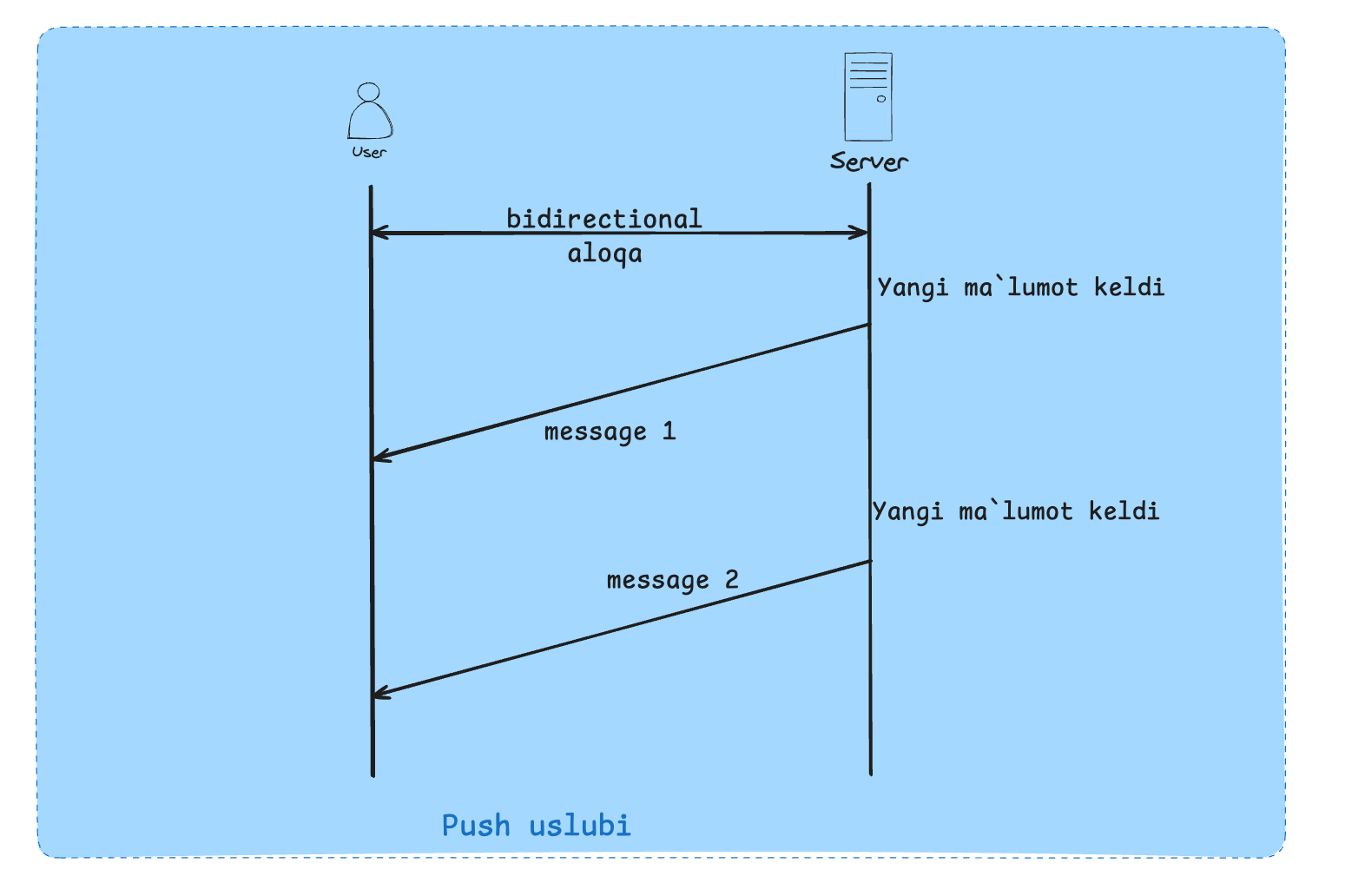
Yaxshi va yomon tomonlari
Yaxshi:
Real time
Yomon :
Foydalanuvchi online bo'lishi kerak (serverga ulangan holda)
Balkim foydalanuvchi bizni ma'lumotni ishlay olmasligi mumkin
Bidirectional protocol talab qiladi
Checklangan reseurga ega bo'lgan userlarga pooling tavsiya etiladi.
Koddagi misol
Biz web client bilan bog'lanish uchun websocketdan foydalanamiz.
Client uchun kodlar
<!DOCTYPE html>
<html>
  <head>
    <title>WebSocket Push</title>
  </head>
  <body>
    <h3>Incoming PUSH data:</h3>
    <ul id="messages"></ul>
    <script>
      const ws = new WebSocket("ws://localhost:8080");
      const list = document.getElementById("messages");
      ws.onmessage = (event) => {
        const data = JSON.parse(event.data);
        const li = document.createElement("li");
        li.textContent = `${data.message} — ${data.time}`;
        list.appendChild(li);
      };
      ws.onopen = () => {
        console.log("Connected to server");
      };
      ws.onclose = () => {
        console.log("Disconnected");
      };
    </script>
  </body>
</html>
Server kodlari :
const WebSocket = require("ws");
const wss = new WebSocket.Server({ port: 8080 });
wss.on("connection", (ws) => {
  const interval = setInterval(() => {
    ws.send(
      JSON.stringify({
        message: "push from server",
        time: new Date().toISOString(),
      })
    );
  }, 2000);
  ws.on("close", () => clearInterval(interval));
});
console.log("WebSocket server is running on ws://localhost:8080");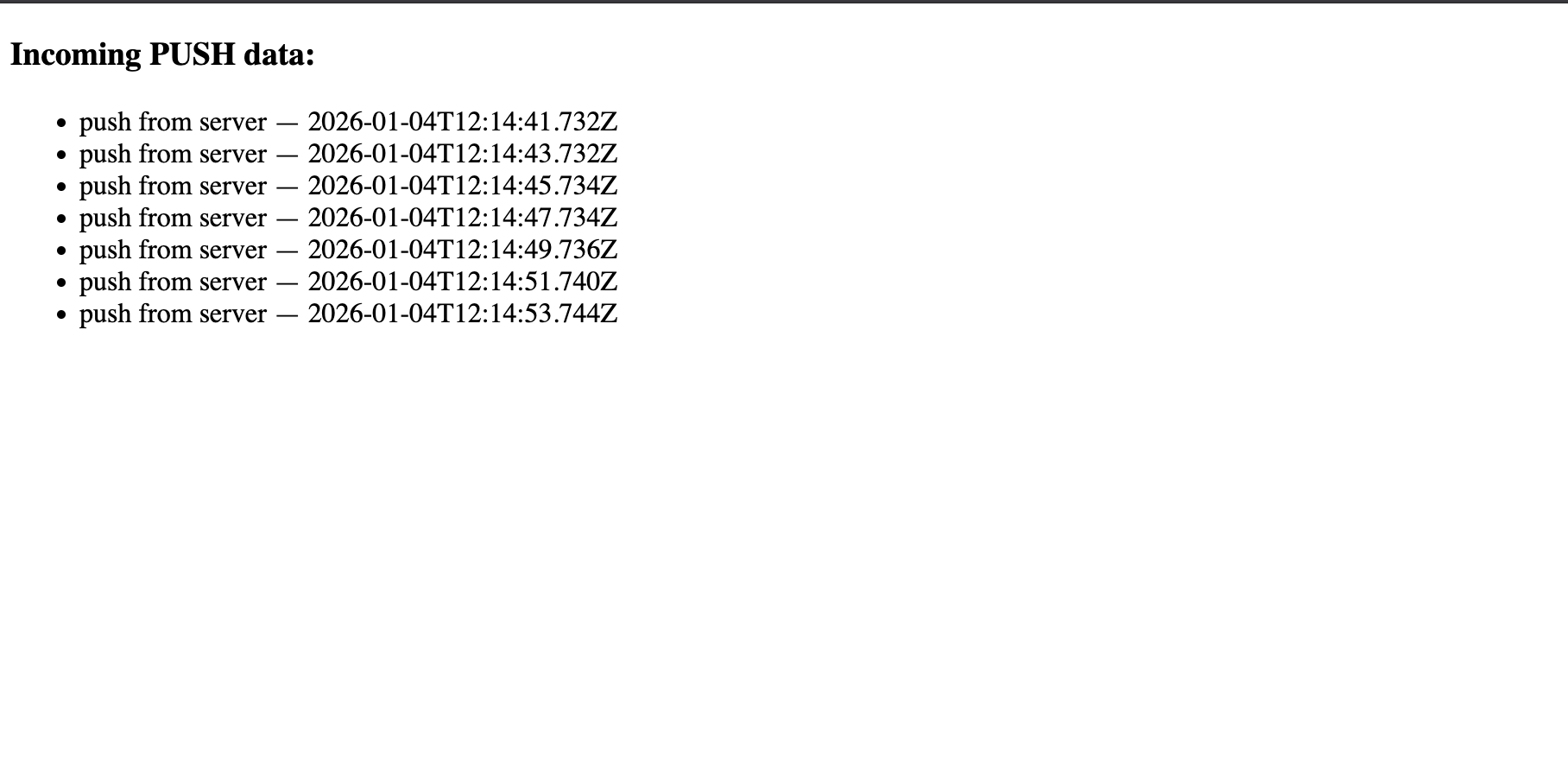
Polling
Polling uchun bizda short polling va long polling uslublari mavjud.
Short polling(so'rov vaqt olyapti , birozdan keyin tekshiraman)
Request response model ideal emas , masalan so'rov ko'p vaqt olmoqda ( youtubega video yuklash).
Short polling nima ?
Foydalanuvchi so'rov yuboradi.
Server tezda id yoki shunga o'xshash narsa bilan javob qaytaradi( vazifa hali ishga tushurilmagan bo'lishi mumkin)
Server vazifani amalga oshirishni davom ettiradi.
Foydalanuvchi berilgan id orqali vazifa holatini tekshirib turadi.
Bir necha kichik request response poll sifatida uzatiladi (bu ham request response boshqacha uslubda ishlatilgan)
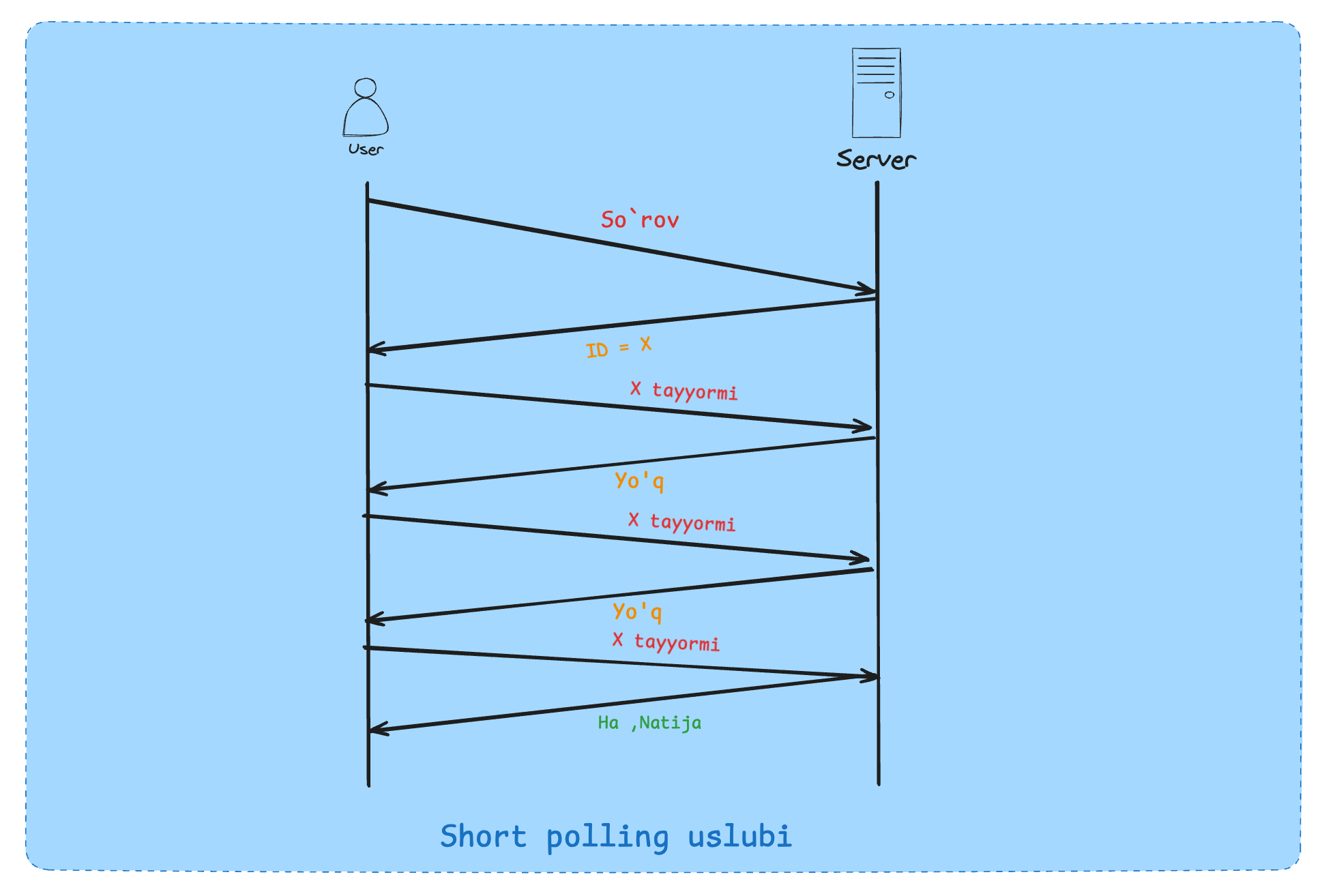
Yaxshi va yomon tomonlari
Yaxshi:
Oddiy , uzoq vaqt ishlaydigan so'rovlar uchun qulay
Foydalanuvchi aloqani uzib qayta bog'lana oladi (jobId saqlanishi kerak)
Yomon:
Juda ko'p so'rovlar server va foydalanuvchilar orasida
Bekor ketgan backend resurslari (har bir bog'lanish(connection) muhim)
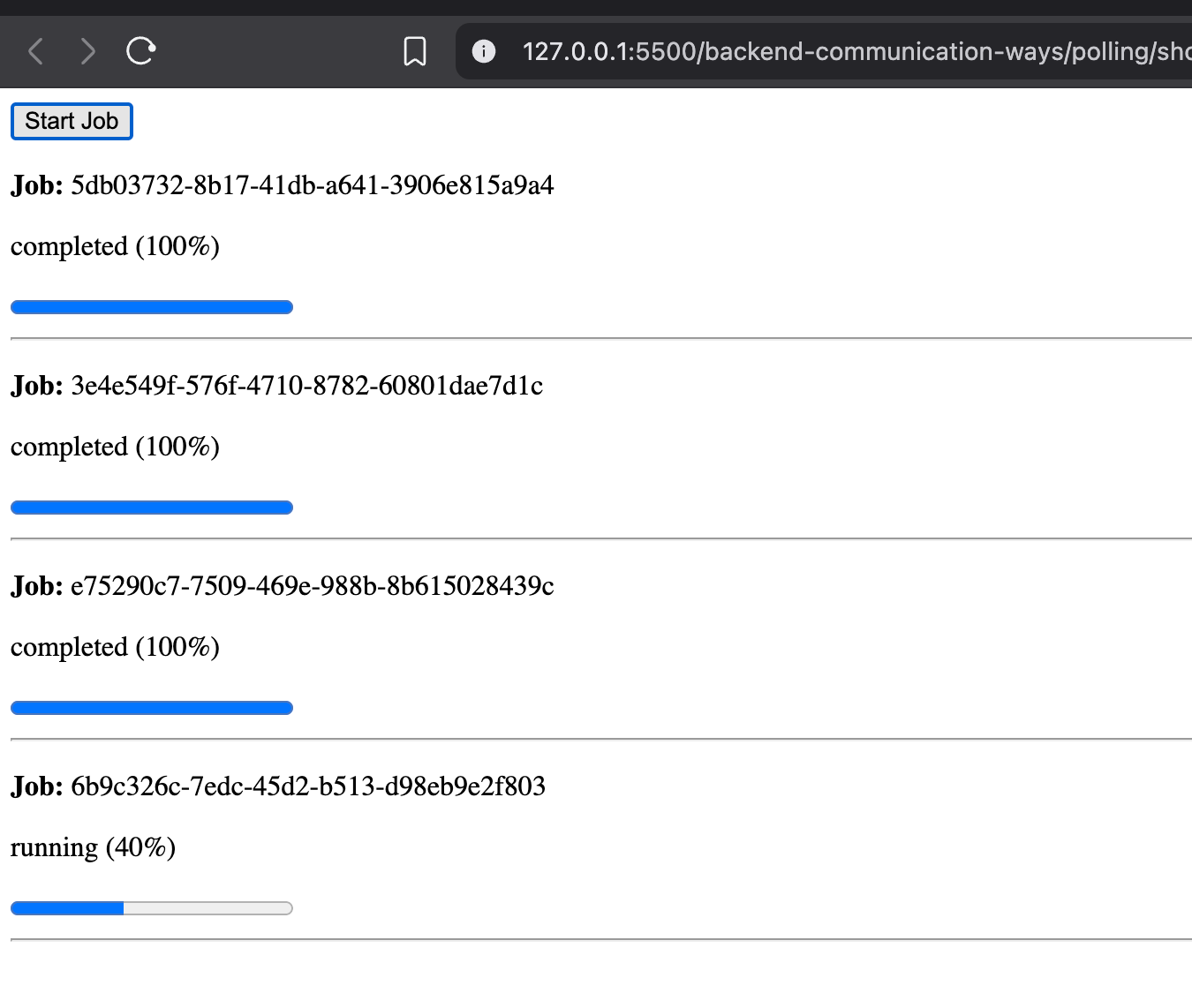
Koddagi misol
Client uchun kodlar :
<!DOCTYPE html>
<html>
  <body>
    <button id="start">Start Job</button>
    <div id="jobs"></div>
    <script>
      const jobsContainer = document.getElementById("jobs");
      const jobs = new Map();
      document.getElementById("start").onclick = async () => {
        const res = await fetch("http://localhost:3000/jobs", {
          method: "POST",
        });
        const { jobId } = await res.json();
        createJobUI(jobId);
        startPolling(jobId);
      };
      function createJobUI(jobId) {
        const wrapper = document.createElement("div");
        wrapper.id = jobId;
        wrapper.innerHTML = `
          <p><strong>Job:</strong> ${jobId}</p>
          <p class="status">pending (0%)</p>
          <progress max="100" value="0"></progress>
          <hr />
        `;
        jobsContainer.appendChild(wrapper);
      }
      function startPolling(jobId) {
        const intervalId = setInterval(async () => {
          const res = await fetch(`http://localhost:3000/jobs/${jobId}`);
          const data = await res.json();
          const jobEl = document.getElementById(jobId);
          jobEl.querySelector(
            ".status"
          ).textContent = `${data.status} (${data.progress}%)`;
          jobEl.querySelector("progress").value = data.progress;
          if (data.status === "completed" || data.status === "failed") {
            clearInterval(intervalId);
            jobs.delete(jobId);
          }
        }, 1500);
        jobs.set(jobId, intervalId);
      }
    </script>
  </body>
</html>
Server kodlari:
import http from "http";
import { randomUUID } from "crypto";
const jobs = new Map();
function startJob() {
  const jobId = randomUUID();
  const job = {
    status: "pending",
    progress: 0,
  };
  jobs.set(jobId, job);
  let progress = 0;
  const interval = setInterval(() => {
    progress += 10;
    job.status = "running";
    job.progress = progress;
    if (progress >= 100) {
      clearInterval(interval);
      job.status = "completed";
      job.progress = 100;
      job.result = { message: "Job finished successfully" };
      setTimeout(() => jobs.delete(jobId), 5 * 60 * 1000);
    }
  }, 1000);
  return jobId;
}
function setCors(res) {
  res.setHeader("Access-Control-Allow-Origin", "*");
  res.setHeader("Access-Control-Allow-Methods", "GET, POST, OPTIONS");
  res.setHeader("Access-Control-Allow-Headers", "Content-Type");
}
const server = http.createServer((req, res) => {
  setCors(res);
  if (req.method === "POST" && req.url === "/jobs") {
    const jobId = startJob();
    res.writeHead(202, { "Content-Type": "application/json" });
    return res.end(JSON.stringify({ jobId }));
  }
  if (req.method === "GET" && req.url.startsWith("/jobs/")) {
    const jobId = req.url.split("/")[2];
    const job = jobs.get(jobId);
    if (!job) {
      res.writeHead(404);
      return res.end("Job not found");
    }
    res.writeHead(200, { "Content-Type": "application/json" });
    return res.end(JSON.stringify(job));
  }
  res.writeHead(404);
  res.end();
});
server.listen(3000, () => {
  console.log("Server running on http://localhost:3000");
});
Xulosa qilmaymiz chunki 2- qism ham chiqadi u qismda qolgan usullar va har birining ishlatilish joyi haqida gaplashamiz.