Backend kommunikatsiya: Long polling, Server-Sent Events va Pub/Sub (2-qism)
Assalamu Alaykum bugun backend foydalanuvchi bilan kommunikatsiya qilish usullarini maqolasini 2–qismini ko'rib chiqamiz. Bu maqolada qolgan uslublar , ular uchun kodlar yozamiz va har birini qaysi joyda ishlatish qulayligini bilib olamiz.
Long polling
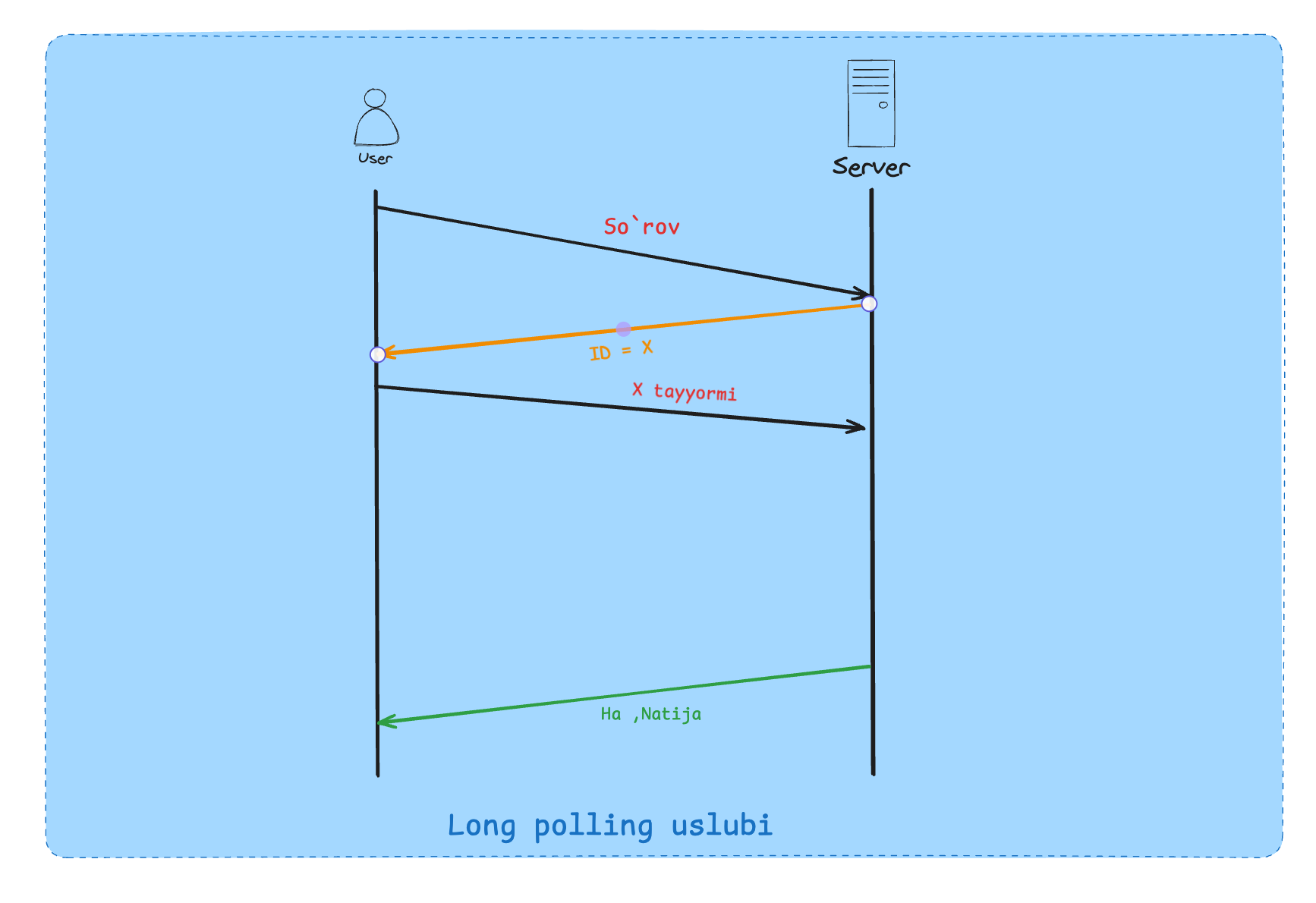
Note: So'rov juda ko'p vaqt olyapti, birozdan keyin so'rayman faqat tayyor bo'lganda javob ber(long polling ideasi)
U qanday ishlaydi ?
Foydalanuvchi ma'lumot olish uchun so'rov jo'natadi .
Server tezda id yoki shunga o'xshash narsa bilan javob qaytaradi( vazifa hali ishga tushurilmagan bo'lishi mumkin)
Server vazifani amalga oshirishni davom ettiradi.
Foydalanuvchi berilgan id orqali vazifa holatini tekshirib turadi.
Server foydalanuvchiga unda natija bo'lmaganicha so'rovlarga javob bermaydi.
Kafka conteksida long polling
Kafka consumer ulangan kafka Topicdan men uchun biror message bormi deb so'raydi. Agarda topicda message bo'lmasa u javob bermaydi. Push modeli Kafka bilan yaxshi ishlamaydi, chunki foydalanuvchilar odatda topicdan kelgan xabarni qayta ishlay olishmasligi mumkin.
Yaxshi va yomon tomonlari
Yaxshi:
Backend bilan kam bog'lanish bo'ladi (short pollingga nisabatan) .
Foydalanuvchi aloqani uzib qayta bog'lana oladi (jobId saqlanishi kerak)
Yomon:
Real time ma'lumot emas (xabar topicda siz olguncha biroz turishi mumkin).
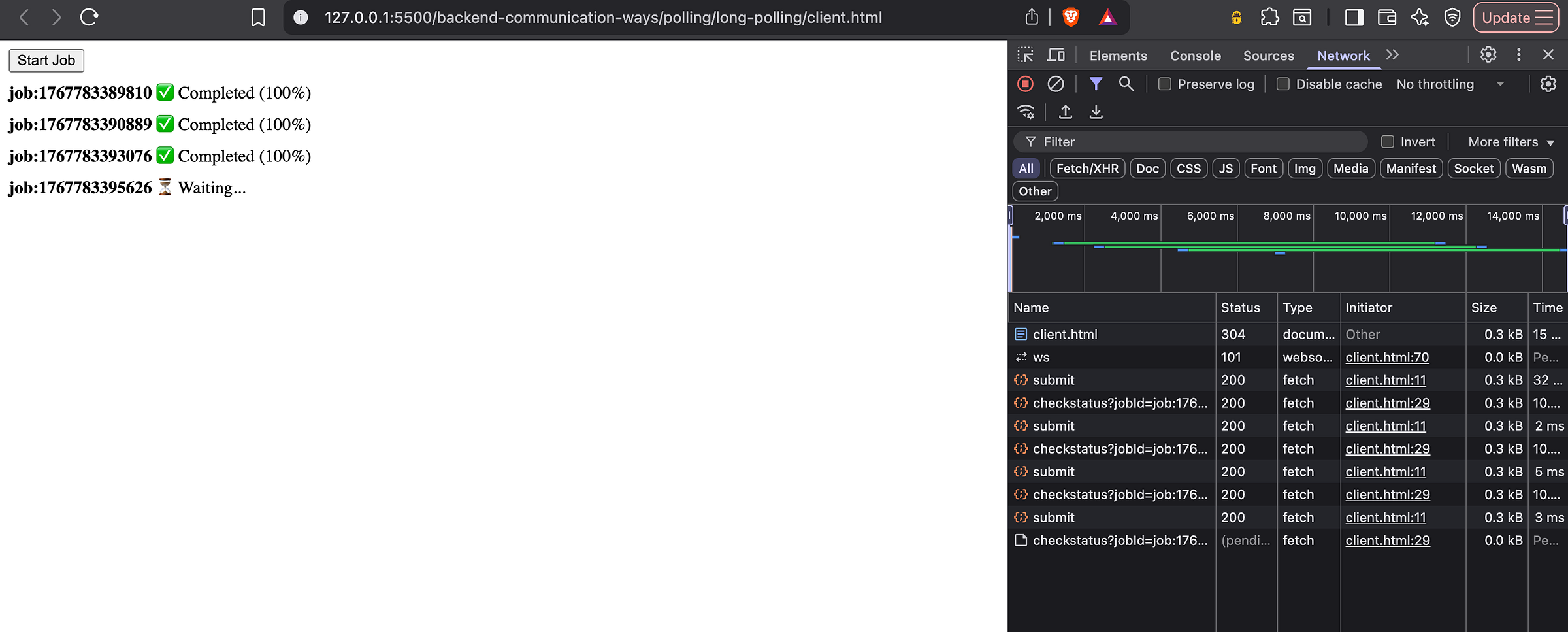
Koddagi misol
Client uchun kodlar :
<!DOCTYPE html>
<html>
  <body>
    <button id="start">Start Job</button>
    <div id="jobs"></div>
    <script>
      const jobsContainer = document.getElementById("jobs");
      document.getElementById("start").onclick = async () => {
        const res = await fetch("http://localhost:8080/submit", {
          method: "POST",
        });
        const { jobId } = await res.json();
        const row = document.createElement("div");
        row.style.margin = "8px 0";
        row.innerHTML = `
          <strong>${jobId}</strong>
          <span class="status"> ⏳ Waiting...</span>
        `;
        jobsContainer.appendChild(row);
        waitUntilDone(jobId, row);
      };
      async function waitUntilDone(jobId, row) {
        try {
          const res = await fetch(
            `http://localhost:8080/checkstatus?jobId=${jobId}`
          );
          if (res.status === 200) {
            const data = await res.json();
            row.querySelector(
              ".status"
            ).textContent = ` ✅ Completed (${data.progress}%)`;
            return;
          }
          waitUntilDone(jobId, row);
        } catch (e) {
          console.error(e);
          setTimeout(() => waitUntilDone(jobId, row), 2000);
        }
      }
    </script>
  </body>
</html>
Server kodlari:
import http from "http";
const jobs = {};
const waitingClients = {};
const server = http.createServer((req, res) => {
  res.setHeader("Access-Control-Allow-Origin", "*");
  res.setHeader("Access-Control-Allow-Methods", "GET, POST, OPTIONS");
  res.setHeader("Access-Control-Allow-Headers", "Content-Type");
  if (req.method === "OPTIONS") {
    res.writeHead(204);
    return res.end();
  }
  if (req.method === "POST" && req.url === "/submit") {
    const jobId = `job:${Date.now()}`;
    jobs[jobId] = 0;
    waitingClients[jobId] = [];
    updateJob(jobId, 0);
    res.writeHead(200, { "Content-Type": "application/json" });
    return res.end(JSON.stringify({ jobId }));
  }
  if (req.method === "GET" && req.url.startsWith("/checkstatus")) {
    const url = new URL(req.url, "http://localhost");
    const jobId = url.searchParams.get("jobId");
    if (!(jobId in jobs)) {
      res.writeHead(404);
      return res.end("Job not found");
    }
    if (jobs[jobId] >= 100) {
      res.writeHead(200, { "Content-Type": "application/json" });
      return res.end(
        JSON.stringify({
          status: "completed",
          progress: 100,
        })
      );
    }
    waitingClients[jobId].push(res);
    // Safety timeout (30s)
    setTimeout(() => {
      const idx = waitingClients[jobId].indexOf(res);
      if (idx !== -1) {
        waitingClients[jobId].splice(idx, 1);
        res.writeHead(204);
        res.end();
      }
    }, 30000);
    return;
  }
  res.writeHead(404);
  res.end("Not found");
});
server.listen(8080, () =>
  console.log("Server running on http://localhost:8080")
);
function updateJob(jobId, prg) {
  jobs[jobId] = prg;
  console.log(`updated ${jobId} -> ${prg}%`);
  if (prg >= 100) {
    waitingClients[jobId].forEach((res) => {
      res.writeHead(200, { "Content-Type": "application/json" });
      res.end(
        JSON.stringify({
          status: "completed",
          progress: 100,
        })
      );
    });
    waitingClients[jobId] = [];
    return;
  }
  setTimeout(() => updateJob(jobId, prg + 10), 1000);
}
Server sent events
Bitta so'rov va juda juda uzun natija.
Request response uslubida cheklovlar bor, foydalanuvchi backenddan real time ma’lumotlar xohlaydi, push ham ishlaydi ammo u cheklovli. Server sent events request response modeli bilan ham ishlaydi va HTTP uchun chiqarilgan.
Server sent event nima ?
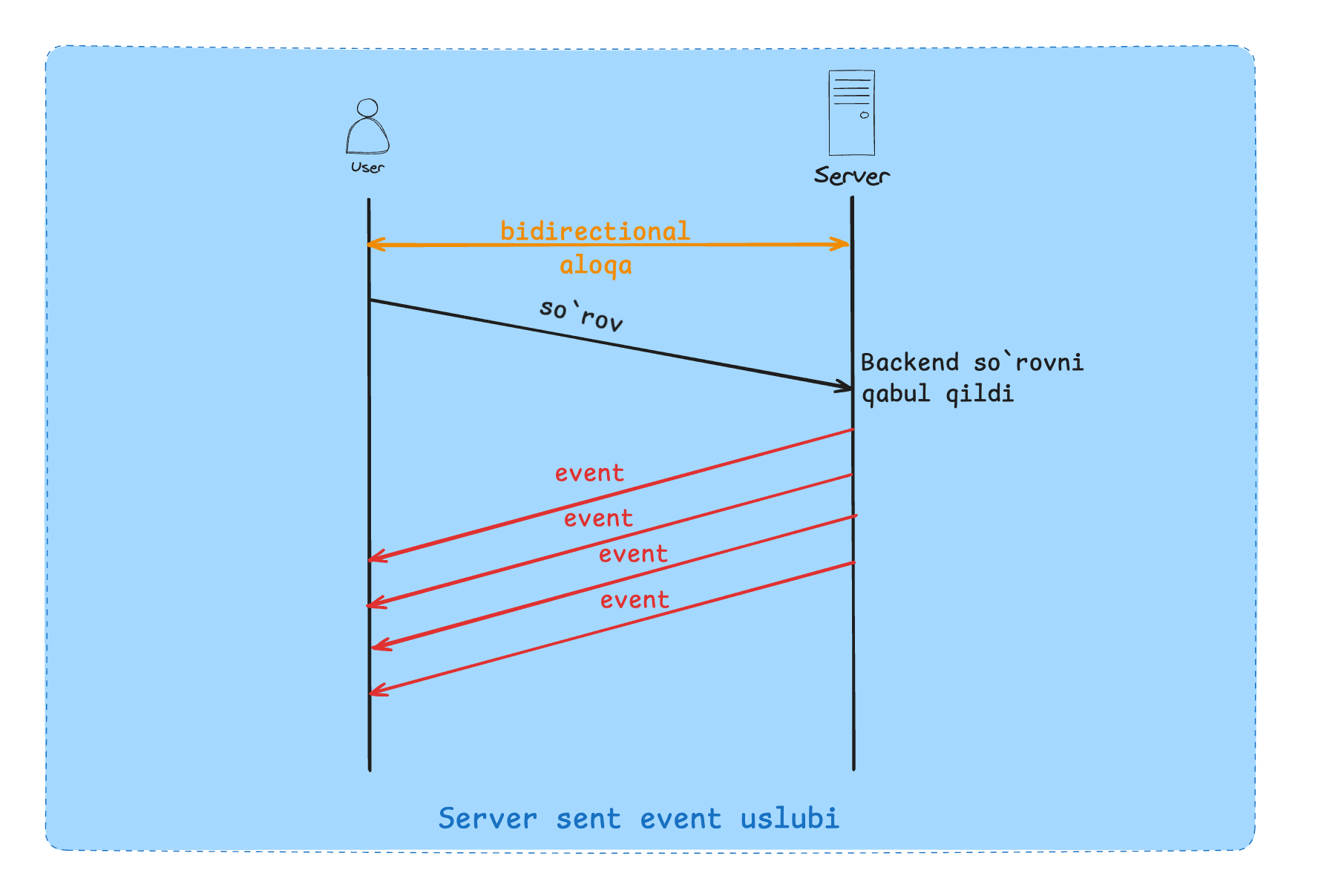
Foydalanuvchi ma'lumot olish uchun so'rov jo'natadi .
Server qismli eventlarni response qismi sifatida yuboradi.
Server hech qachon response tugaganligini yozmaydi.
Bu request response modeli faqat response tugamaydi.
Foydalanuvchi har bir stream ma'lumotni olib ko'rsatadi.
HTTP 1.0 versiyasi bu bilan ishlamaydi chunki streamingni(duplexing) qo'llab quvvatlamaydi .
Yaxshi va yomon tomonlari
Yaxshi:
Real time ma'lumotlar
Request response modeliga tushadi
Yomon:
Foydalanuvchi online bo'lishi kerak
Foydalanuvchi kelgan ma'lumotni qayta ishlay olmasligi mumkin.
Oddiy foydalanuvchilar uchun polling tavsiya etiladi.
HTTP 1.1 da bir domain uchun 6 ta connection bo'ladi (chrome tomonidan qo'yilgan) hammasini bloklab qo'yishimiz mumkin.
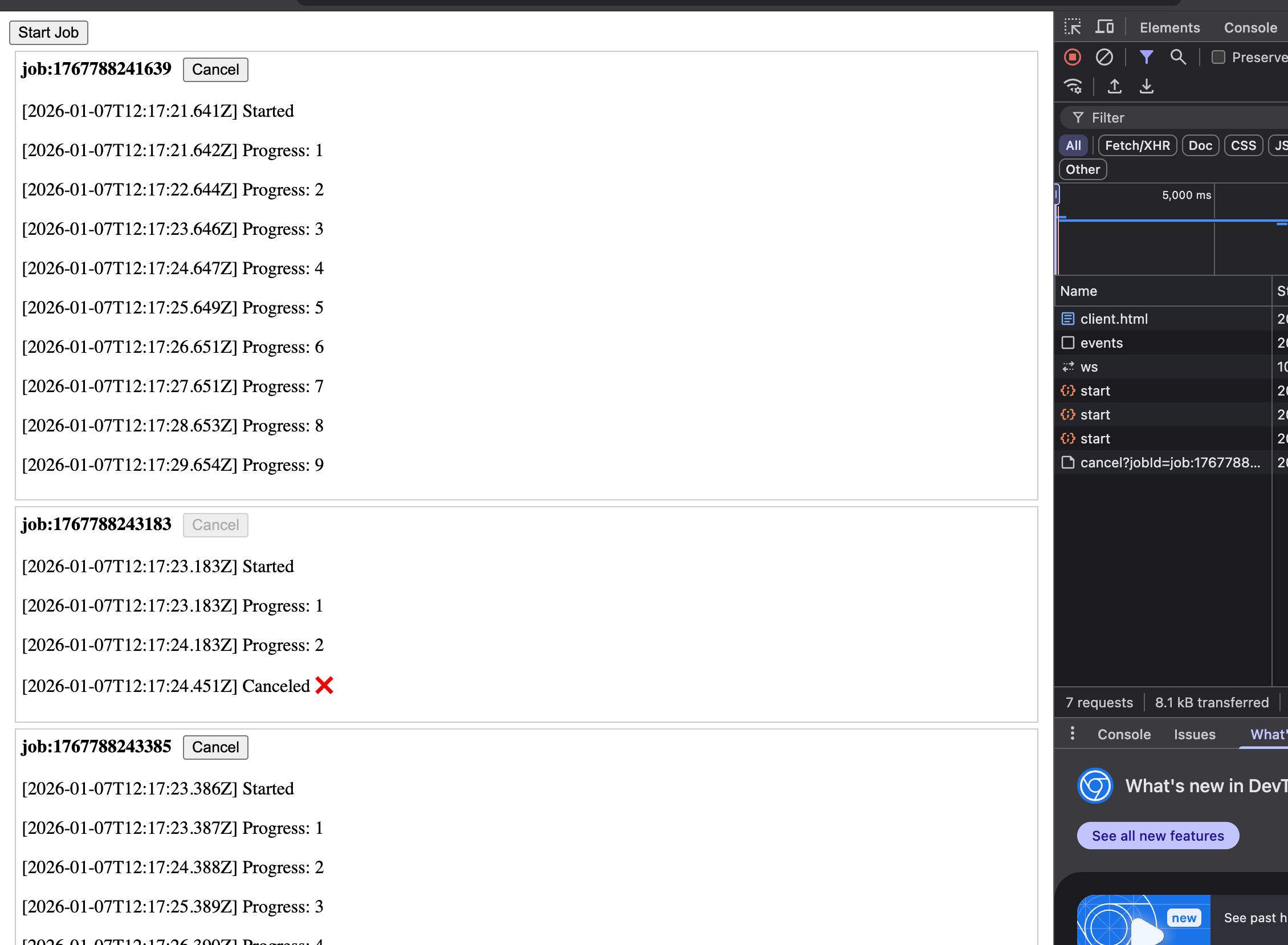
Koddagi misol
Client uchun kodlar :
<!DOCTYPE html>
<html>
  <body>
    <button id="start">Start Job</button>
    <div id="jobs"></div>
    <script>
      const jobs = {};
      const jobsDiv = document.getElementById("jobs");
      const es = new EventSource("http://localhost:8080/events");
      function log(jobId, msg, time) {
        const div = jobs[jobId];
        if (!div) return;
        const p = document.createElement("p");
        p.textContent = `[${time}] ${msg}`;
        div.appendChild(p);
      }
      es.addEventListener("job-start", (e) => {
        const { jobId, timestamp } = JSON.parse(e.data);
        const div = document.createElement("div");
        div.style.border = "1px solid #ccc";
        div.style.margin = "5px";
        div.style.padding = "5px";
        const cancelBtn = document.createElement("button");
        cancelBtn.textContent = "Cancel";
        cancelBtn.style.marginLeft = "10px";
        cancelBtn.onclick = async () => {
          cancelBtn.disabled = true; // prevent double-click
          try {
            const res = await fetch(
              `http://localhost:8080/cancel?jobId=${jobId}`,
              {
                method: "POST",
              }
            );
            if (!res.ok) {
              console.error("Cancel failed:", await res.text());
            }
          } catch (err) {
            console.error("Cancel request error:", err);
          }
        };
        const header = document.createElement("div");
        header.innerHTML = `<b>${jobId}</b>`;
        header.appendChild(cancelBtn);
        div.appendChild(header);
        jobs[jobId] = div;
        jobsDiv.appendChild(div);
        log(jobId, "Started", timestamp);
      });
      es.addEventListener("job-update", (e) => {
        const { jobId, progress, timestamp } = JSON.parse(e.data);
        log(jobId, `Progress: ${progress}`, timestamp);
      });
      es.addEventListener("job-cancel", (e) => {
        const { jobId, timestamp } = JSON.parse(e.data);
        log(jobId, "Canceled ❌", timestamp);
      });
      document.getElementById("start").onclick = async () => {
        try {
          await fetch("http://localhost:8080/start", { method: "POST" });
        } catch (err) {
          console.error("Failed to start job:", err);
        }
      };
    </script>
  </body>
</html>
Server kodlari :
import http from "http";
const clients = new Set();
const jobs = {};
const server = http.createServer((req, res) => {
  res.setHeader("Access-Control-Allow-Origin", "*");
  res.setHeader("Access-Control-Allow-Methods", "GET, POST, OPTIONS");
  res.setHeader("Access-Control-Allow-Headers", "Content-Type");
  if (req.method === "OPTIONS") {
    res.writeHead(204);
    return res.end();
  }
  if (req.method === "GET" && req.url === "/events") {
    res.writeHead(200, {
      "Content-Type": "text/event-stream",
      "Cache-Control": "no-cache",
      Connection: "keep-alive",
    });
    res.write("\n");
    clients.add(res);
    req.on("close", () => clients.delete(res));
    return;
  }
  if (req.method === "POST" && req.url === "/start") {
    const jobId = `job:${Date.now()}`;
    jobs[jobId] = { progress: 0, status: "RUNNING", timer: null };
    broadcast("job-start", { jobId });
    runJob(jobId);
    res.writeHead(200, { "Content-Type": "application/json" });
    return res.end(JSON.stringify({ jobId }));
  }
  if (req.method === "POST" && req.url.startsWith("/cancel")) {
    const url = new URL(req.url, "http://localhost");
    const jobId = url.searchParams.get("jobId");
    const job = jobs[jobId];
    if (!job || job.status !== "RUNNING") {
      res.writeHead(404);
      return res.end("Job not found or already canceled");
    }
    job.status = "CANCELED";
    clearTimeout(job.timer);
    broadcast("job-cancel", { jobId });
    res.writeHead(200);
    return res.end("Canceled");
  }
  res.writeHead(404);
  res.end("Not found");
});
server.listen(8080, () =>
  console.log("SSE server running on http://localhost:8080")
);
function runJob(jobId) {
  const job = jobs[jobId];
  if (!job || job.status !== "RUNNING") return;
  job.progress += 1;
  broadcast("job-update", { jobId, progress: job.progress });
  job.timer = setTimeout(() => runJob(jobId), 1000);
}
function broadcast(event, data) {
  const payload =
    `event: ${event}\n` +
    `data: ${JSON.stringify({
      ...data,
      timestamp: new Date().toISOString(),
    })}\n\n`;
  clients.forEach((res) => res.write(payload));
}
Publish Subscribe
Request response modeli ko'p vaqt oladigan va ayniqsa bir nechta service bu so'rovni qayta ishlashi kerak bo'ladigan ishlar uchun qulay emas .
Masalan video processing qiluvchi dasturlarda video har xil formatlarga o'girilishi kerak, har xil hajmga o'girilishi , kompress qilinishi balkim transkripsiya qo'shilishi mumkin va bu holatda birortasi fail bo'lsa request response modelida hammasi qaytadan boshlanishi hamda ishlar tugagancha foydalanuvchi blok holatda turadi va hech narsa qila olmaydi.
Pub-sub nima?
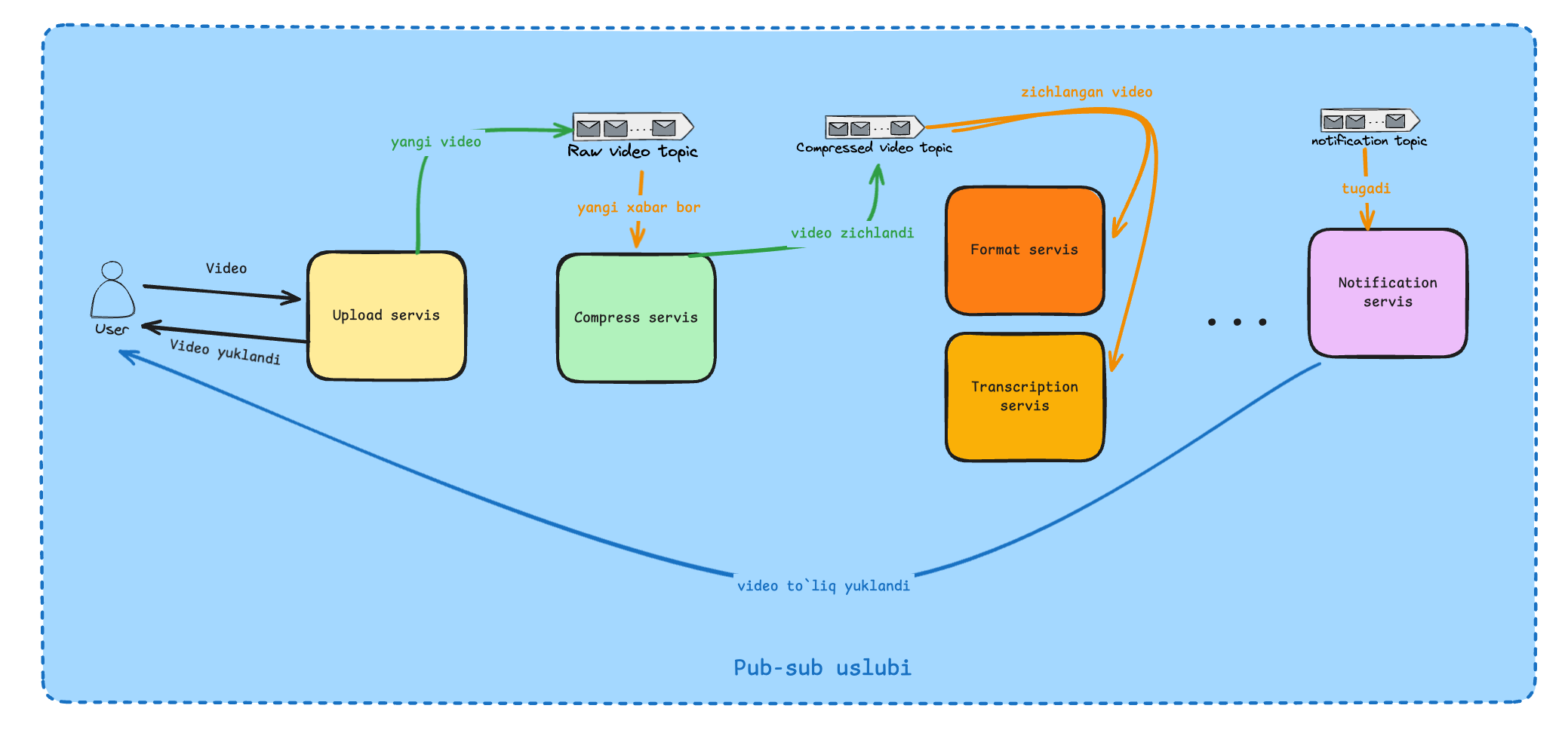
Pub-sub modelida xuddi shu ish qanday bo'ladi ? Foydalanuvchi Upload servisga videni yuklaydi. Upload servis foydalanuvchiga video yuklanganligi haqida ma'lumot beradi va foydalanuvchi endi xohlaganini qilishi mumkin u erkin. Upload servis videoni raw-video topic yoki kanaliga yuklaydi (message queue yoki message broker) . raw-video topikda ma'lumot borligi uchun Compress service Consumer/Subscriber sifatida ma'lumotni olib compresslangan video generatsiya qiladi va compressed-video kanaliga yuklaydi. Bu yerdan uni format service va transcription servis olib natijalarni har xil topiclarga yuklashadi va hamma ishlar tugatilgandan so'ng notificationtopicga yuklanadi va Notification serivis foydalanuvchiga video to'liq tayyor bo'lganini bildiradi.
Xabarlarni topiklarda olish backend sistemasiga implimentatsiyasiga bog'liq . Bu Push orqali bo'lishi mumkin (RabbitMq) yoki Long Poll orqali (Kafka) Bo'lishi mumkin or yoki butunlay boshqa uslub.
Yaxshi va yomon tomonlari
Yaxshi:
Bir necha qabul qiluvchiga oson kengayadi
Microservislar uchun juda qulay (Servislar orasidagi bog'liqlikni yo'qotadi)
Client online bo'lmasa ham ishlayveradi
Yomon:
Dasturga message brokerlar tufayli murakkablik qo'shiladi
Xabarni to'g'ri yetkazish yoki yo'qotmaslik muammosi.
Koddagi misol (Repoda asosiy qism)
Docker buyruq RabbitMq yoqish uchun :
docker run -it --rm \
  -p 5672:5672 \
  -p 15672:15672 \
  rabbitmq:3-management
Qolgan kodlarni ushbu repodan topishingiz mumkin. Repo
Xulosa
Endi xulosa qilib aytadigan bo'lsak Request response uslubi bu doimiy ishlatilinadigan CRUD APIlar uchun mos, push modeli eas websocketdan foydalangan holda notificationlarni yetkazish uchun ishlatilinishi mumkin, short polling esa vaqti vaqti bilan tekshirilib turiladigan ishlarga qulay (ayniqsa ko'p vaqt oladigan vazifalarda) , long polling chat yoki alertlar uchun ishlatsak bo'ladi. SSE ni esa live streaming uchun ishlatsak bo'ladi chunki to'xtovsiz response kelib turadi. Pub-sub uslubi microservicelar va event-driven arxitektura uchun mos tushadi.