Proxy nima? Forward va reverse proxy farqi (amaliyot bilan)
Assalamu Alaykum bugun proxylar nimaligi va ular nimaga kerakligini ko'rib chiqamiz va amaliyot orqali bu bilimlarni mustahkamlaymiz.
Proxy o'zi nima u ?
Proxy bu 2 ta qurilma yoki qurilmalar guruhi o'rtasida turadigan qism (yoki qurilma) . Asosiy maqsad doimgidek dasturlashda murakkablikni abstraksiyalash ya'ni yashirish. Proxy xavfsizlikni oshirishga, trafikni boshqarish va bundan tashqari bir necha ishga yordam beradi.
Yani bir so'z bilan aytganda sizning o'rningiz siz uchun ishni qiladigan narsa.
Bizda 2 xil proxy mavjudforward va reverse proxy .
Forward proxy nima?
Bu foydalanuvchi va internet o’rtasida turuvchi proxy foydalanuvchi internetga to'g'ridan to'g'ri chiqa olmaydi faqat proxy orqali chiqadi serverlar proxyni taniydi foydalanuvchi haqida ma'lumotga ega bo'lmaydi . Proxy har bir so'rov natijalarini foydalanuvchiga yetkazib turadi.
Qachon foydalaniladi:
Anonimlik va maxfiylik foydalanuvchi manzillarini yashirgan holda ma'lumotlarni qidirish imkonini beradi.
Ma'lum bir joydagi(maktab, kollej) saytlarga kirishni taqiqlash (so'rov saytga yetib bormasdan admin tomonidan rad etiladi)
Geografik cheklovlarni aylanib o'tish uchun (Germaniyadagi serverga faqatgina Yevropadan ulanish mumkin misol tariqasida siz O'zbekistondan proxy orqali ulanasiz)
Cachelash. Ko'p so'raladigan saytlarni proxyda saqlab so'rovlarni tezlashtirish (kollej uchun java yoki python docsni saqlab offline ham ishlatish imkoni bo'ladi)
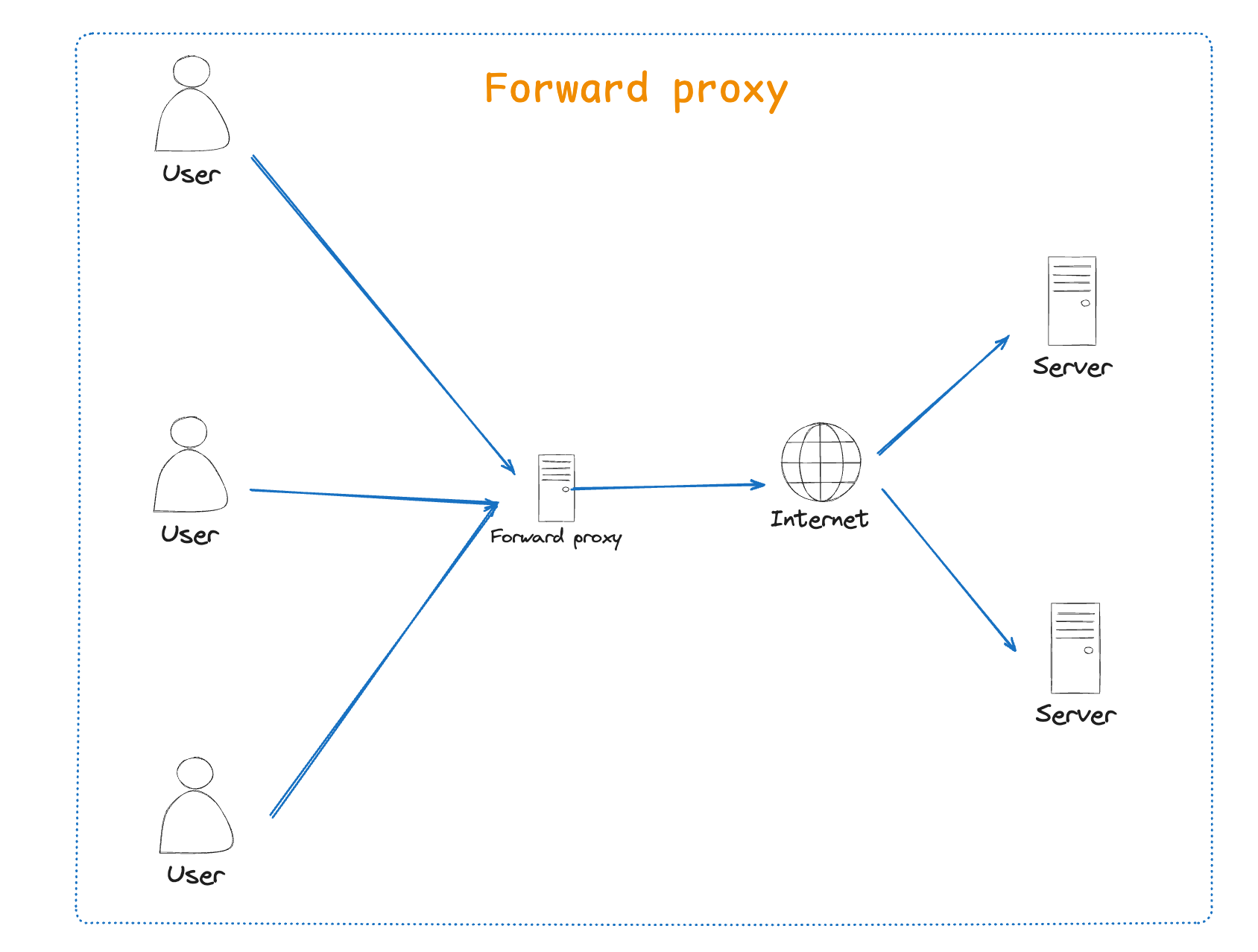
Note: Agarda davlatlar har xil dasturlarni bloklamoqchi bo'lsa bu ISP(internet provider)da checklov qo'yiladi chunki ISP bizga global internetga chiqish uchun forward proxy bo'lib xizmat qiladi.
VPN ham proxy bilan bir xilmi ?
Yo'q. Ikkalasi ham sizning IP addressingizni yashiradi , ammo VPN hamma trafik shifrlangan bo'ladi va bu uni xavfsiz qiladi . Proxy esa trafikni yo'naltiradi va boshqa har xil holatlar uchun ishlatilishi mumkin.
Reverse proxy nima ?
Reverse proxy server va internet(foydalanuvchilar) o'rtasida turadi . Foydalanuvchilar proxyni server deb o'ylashadi ,serverga bog'lanish bo'lmaydi . Load balancing , caching , xavfsizlik va SSL termination uchun ishlatilinadi.
Qachon foydalaniladi:
Xavfsizlik uchun DDoshujumlaridan qochishda (backend serverlarni yashiradi
SSL termination (cpu uchun og'ir bo'lgan shifrlashlarni proxy qiladi)
Caching va kompressqilish orqali loadni kamaytirish
Load balancing trafikni serverlar orasida tarqatish
NGNIX, Cloudflare ,AWS ALB reverse proxy sifatida ishlatilinadi
CDN reverse proxy ni Canary deployment(bir qism serverga yangi kodlar yuklanadi qolgani eski versiyada ishlaydi) qilishda ishlatadi.
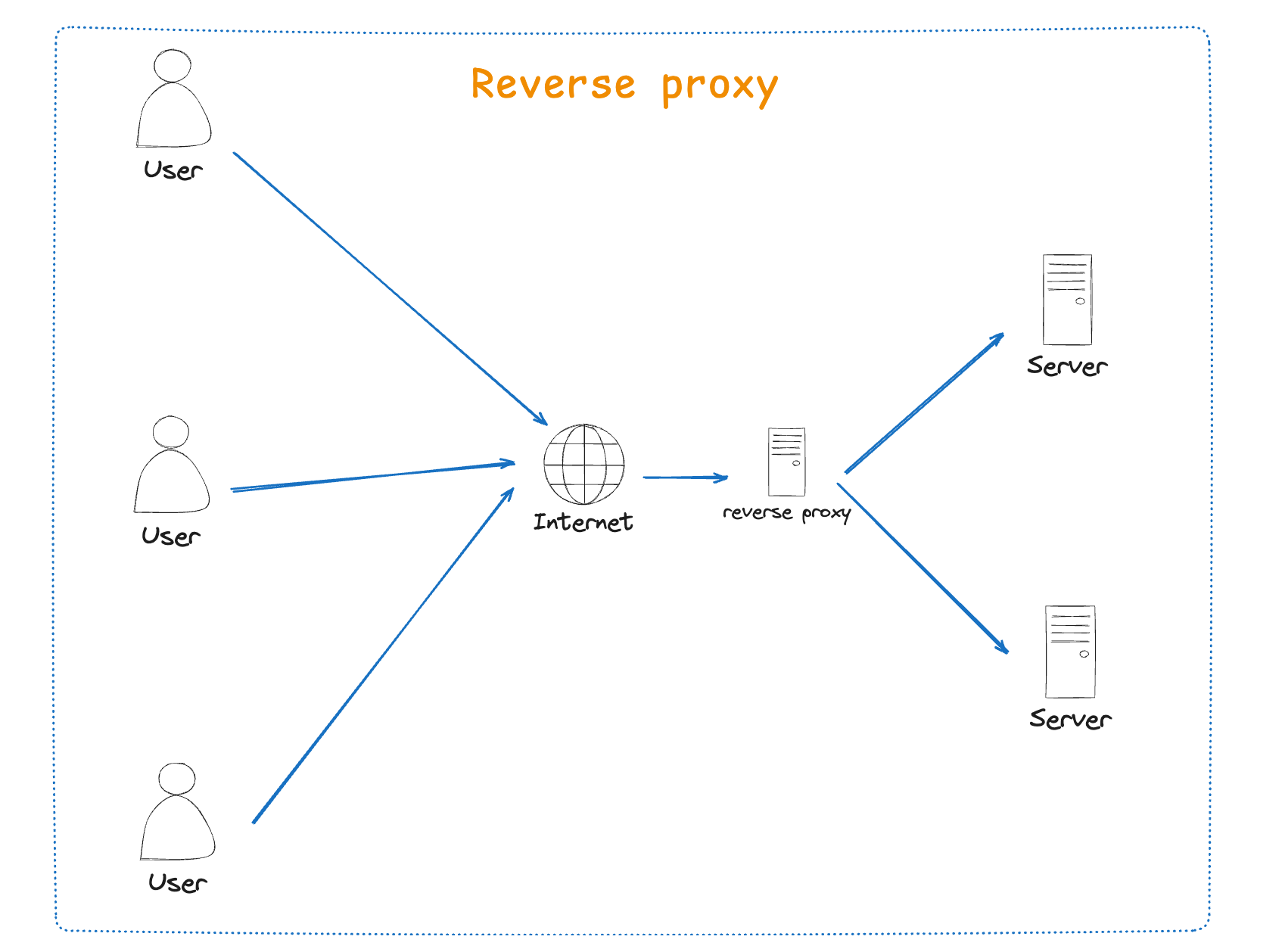
VPNlar sizning so'rovlaringizni ochib ko'rmaydi proxy. esa ochib ko'radi buni hisobga oling
Cloudlarda reverse proxy
Cloudda odatda load balancer va reverse proxylar birgalikda ishlatilinadi , load balancer public internetga ochiq bo'ladi va so'rovlarni private (cloudda) qismga yetkazadi reverse proxy esa shu private tarmoq ichida trafikni taqsimlaydi . Bu yerda reverse proxy faqat bitta ochiq Ip address qoldirib backend serverlarni xavsizlikni ta'minlaydi .
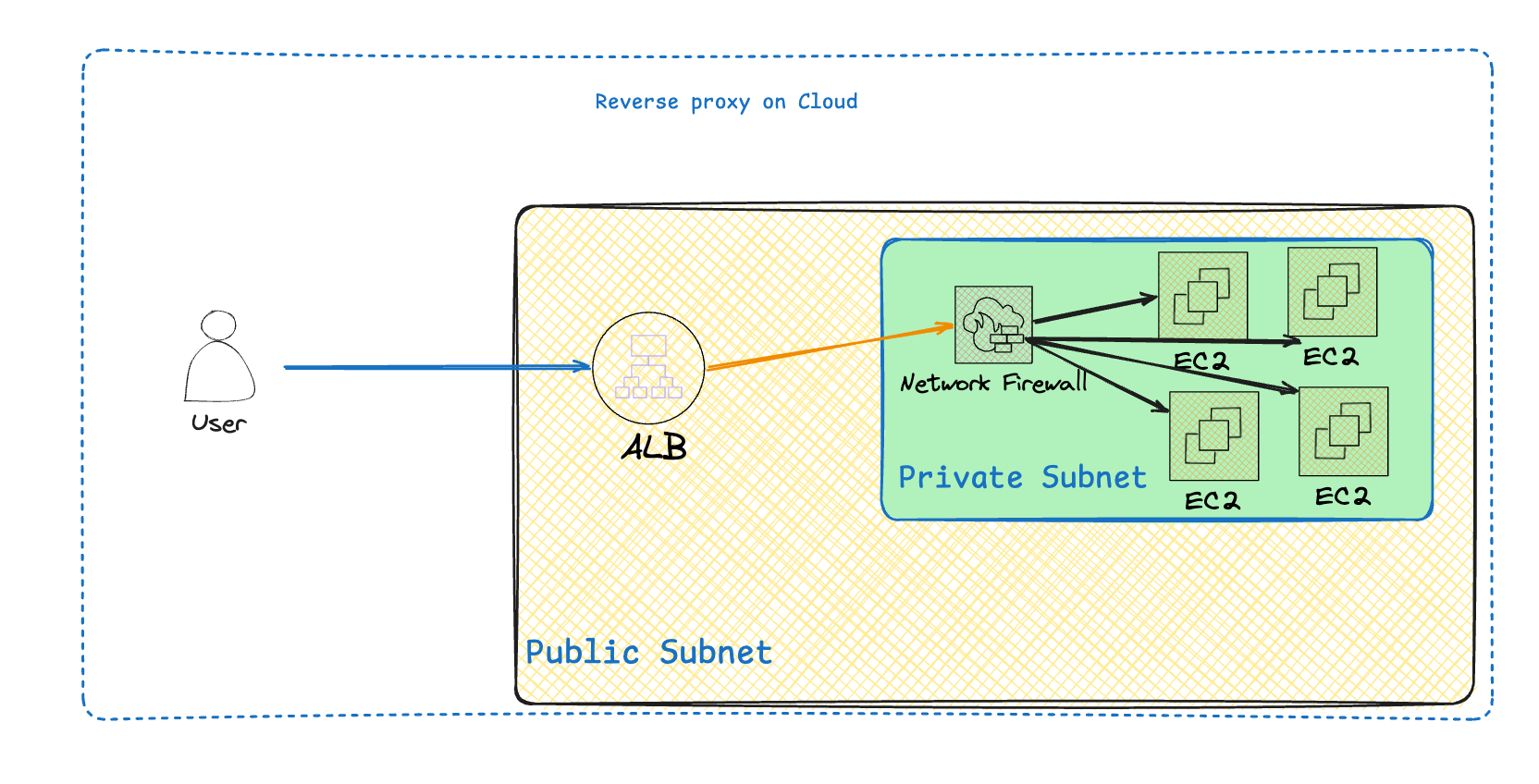
Load balancer odatda siz bir nechta serverga trafik taqsimlaganda ishlatish ma'qul bo'ladi , reverse proxy esa bitta serverga tepadagi xususiyatlar bilan yordam beradi.
Amaliyot
Hammasini teoreyadan tashqari endi sinab ko'rib mustahkamlaymiz birinchi forward proxydan boshlaymiz :
Forward proxy
Bu misolda Nginx froward proxy sifatida ishlaydi 2ta serverni yoqamiz proxy orqali kelsa 2-chi serverga so'rov blocklanadi, tashqaridan kelsa esa server ochiq bo'ladi.
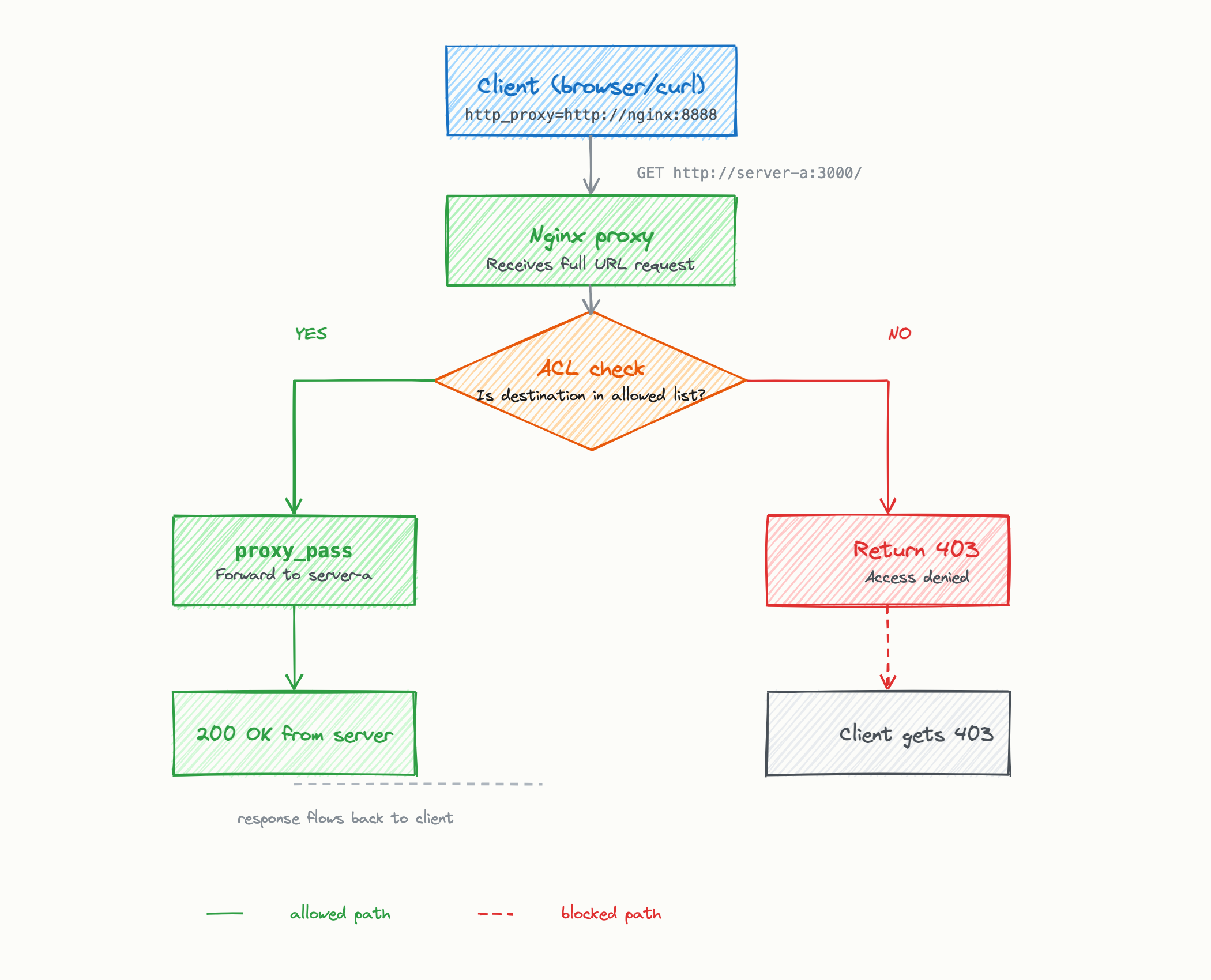
bu misolda bizda 4 ta fayl bo'ladi server a va b nginx konfiguratsiyasi va docker-compose fayl
unda serverlardan boshlaymiz server-a :
const http = require("http");
http.createServer((req, res) => {
  const from = req.headers["x-forwarded-for"] || req.socket.remoteAddress;
  console.log(`[server-a] ${req.method} ${req.url} (from ${from})`);
  res.writeHead(200, { "Content-Type": "application/json" });
  res.end(JSON.stringify({
    server: "A",
    status: "ALLOWED",
    message: "You reached server-a through the Nginx forward proxy!",
    path: req.url,
  }, null, 2));
}).listen(3000, () => console.log("server-a listening on :3000"));
endi esa server-b :
const http = require("http");
http.createServer((req, res) => {
  console.log(`[server-b] ${req.method} ${req.url} ← this should NEVER appear if proxy is working`);
  res.writeHead(200, { "Content-Type": "application/json" });
  res.end(JSON.stringify({
    server: "B",
    status: "REACHED_DIRECTLY",
    warning: "You bypassed the proxy! The proxy should have returned 403.",
  }, null, 2));
}).listen(3000, () => console.log("server-b listening on :3000"));
endi esa nginx config:
map $http_host $allowed_host {
  default 0;
  "~*^server-a" 1;
}
server {
  listen 8888;
  if ($allowed_host = 0) {
    return 403 "Forbidden: $http_host is not in the allowed list\n";
  }
  location / {
    resolver 127.0.0.11 valid=30s;
    proxy_pass $scheme://$http_host$request_uri;
    proxy_set_header Host $http_host;
    proxy_set_header X-Real-IP $remote_addr;
    proxy_set_header X-Forwarded-For $proxy_add_x_forwarded_for;
    proxy_connect_timeout 5s;
    proxy_read_timeout 10s;
  }
}
endi docker-compose faylni yozamiz :
version: "3.8"
networks:
  proxy-net:
    driver: bridge
services:
  nginx-proxy:
    image: nginx:1.25-alpine
    container_name: nginx-forward-proxy
    ports:
      - "8888:8888"
    volumes:
      - ./nginx.conf:/etc/nginx/conf.d/default.conf:ro
    networks:
      - proxy-net
    restart: unless-stopped
  server-a:
    image: node:18-alpine
    container_name: server-a
    hostname: server-a
    working_dir: /app
    volumes:
      - ./:/app
    command: node server-a.js
    ports:
      - "3001:3000"
    networks:
      - proxy-net
    restart: unless-stopped
  server-b:
    image: node:18-alpine
    container_name: server-b
    hostname: server-b
    working_dir: /app
    volumes:
      - ./:/app
    command: node server-b.js
    ports:
      - "3002:3000"
    networks:
      - proxy-net
    restart: unless-stopped
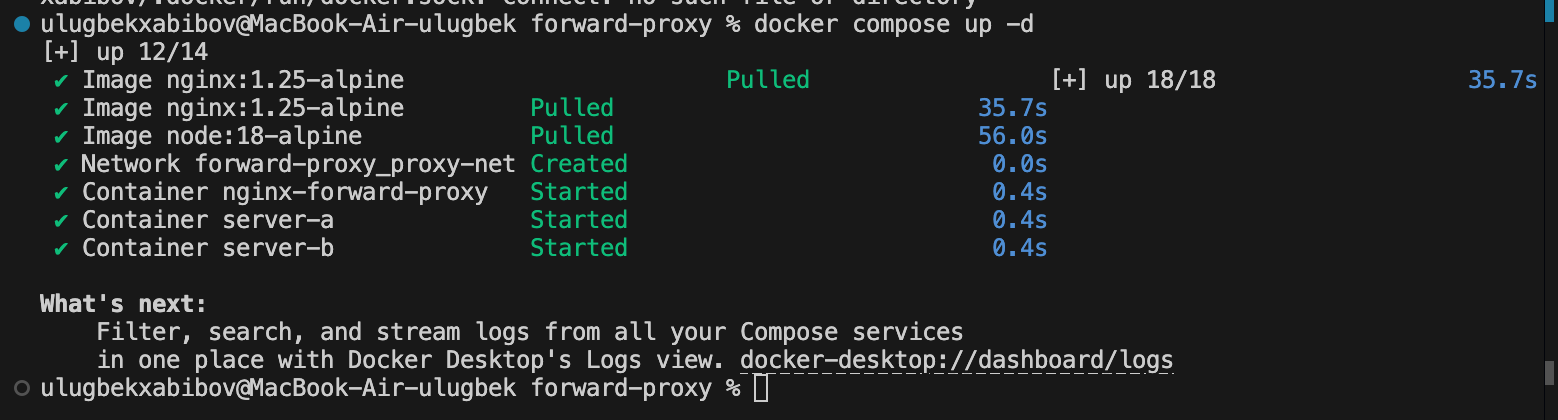
Endi bularni ushbu buyruqlar bilan ishga tushuramiz :
docker compose up -d
docker compose ps
Mana hammasi ishga tushdi :
Endi ushbu buyruqlar bilan server va proxy ishlayotganini tekshiramiz :
curl http://localhost:3001
curl http://localhost:3002
curl -x http://localhost:8888 http://server-a:3000
curl -x http://localhost:8888 http://server-b:3000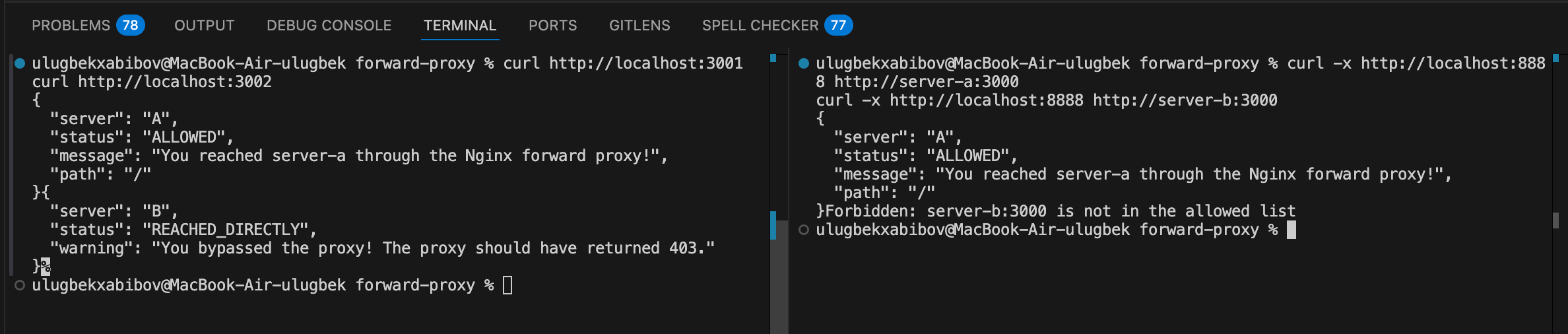
Serverlar o'z portidan chaqirganda javob kelmoqda ammo proxy bilan bo'lsa server-b blocklangan.
Reverse proxy
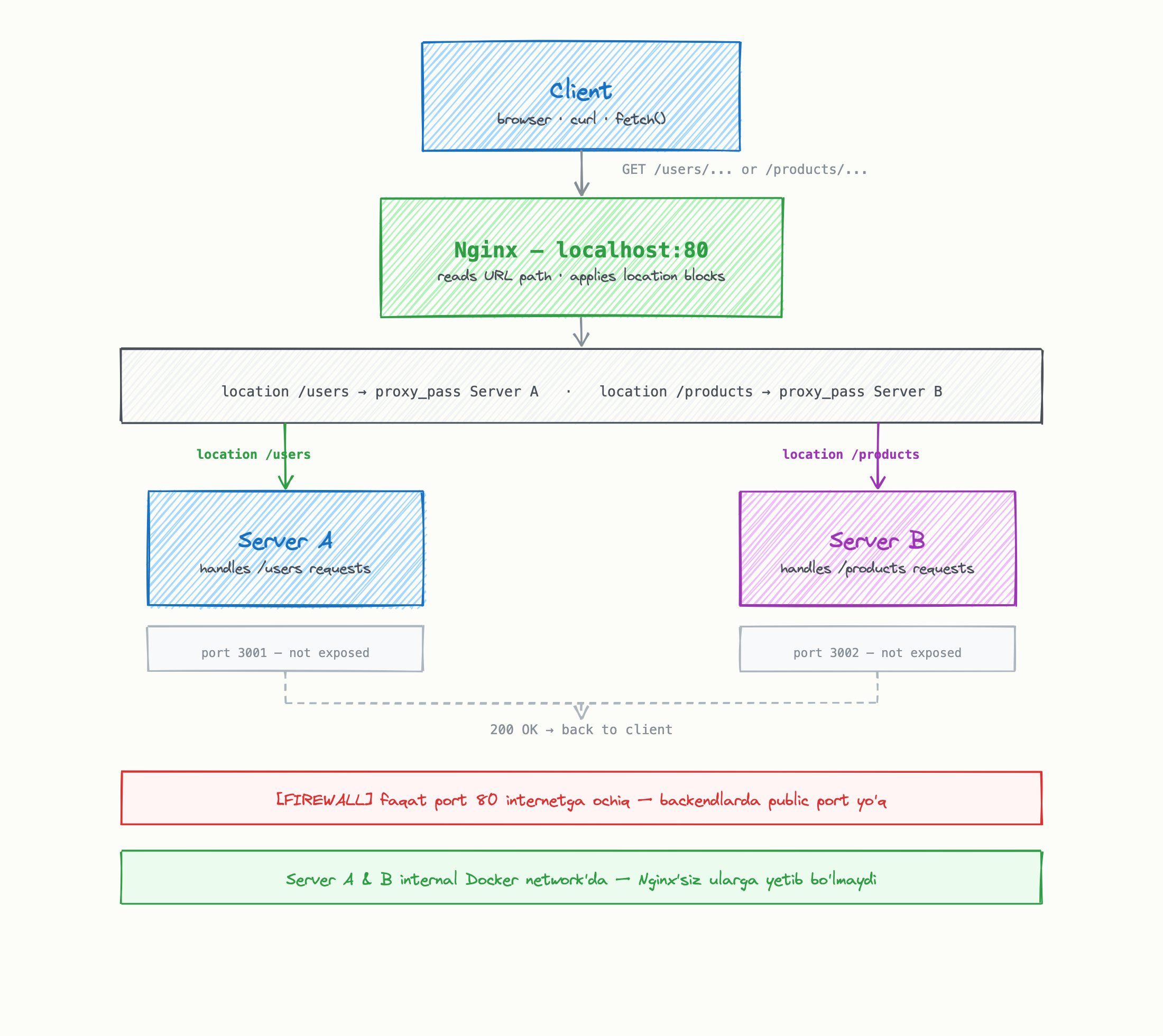
Endi bu misolda reverse proxy kelgan apiga qarab serverni tanlab undan ma'lumot olib beradi . users server-a dan bo'lsa products server-bdan unda birinchi. serverlarni yaratub olamiz.
server-a.js
const http = require("http");
const users = [
  { id: 1, name: "John Doe" },
  { id: 2, name: "Alice Smith" },
  { id: 3, name: "Bob Johnson" },
];
const server = http.createServer((req, res) => {
  res.setHeader("Content-Type", "application/json");
  if (req.url === "/users") {
    res.writeHead(200);
    return res.end(JSON.stringify(users));
  }
  res.writeHead(404);
  res.end(JSON.stringify({ message: "Route not found on Server A" }));
});
server.listen(3000, () => {
  console.log("Users service running on port 3000");
});
server-b.js
const http = require('http');
const products = [
  { id: 1, name: 'Laptop', price: 1200 },
  { id: 2, name: 'Mouse', price: 25 },
  { id: 3, name: 'Keyboard', price: 80 },
];
const server = http.createServer((req, res) => {
  res.setHeader('Content-Type', 'application/json');
  if (req.url === '/products') {
    res.writeHead(200);
    return res.end(JSON.stringify(products));
  }
  res.writeHead(404);
  res.end(JSON.stringify({ message: 'Route not found on Server B' }));
});
server.listen(3000, () => {
  console.log('Products service running on port 3000');
});
endi nginx config faylini yozamiz :
server {
  listen 80;
  location /users {
    proxy_pass http://server-a:3000/users;
  }
  location /products {
    proxy_pass http://server-b:3000/products;
  }
}
endi docker compose faylini yaratamiz :
services:
  nginx:
    image: nginx:alpine
    ports:
      - "80:80"
    volumes:
      - ./nginx.conf:/etc/nginx/conf.d/default.conf:ro
  server-a:
    image: node:18-alpine
    working_dir: /app
    volumes:
      - ./:/app
    command: node server-a.js
    expose:
      - "3000"
  server-b:
    image: node:18-alpine
    working_dir: /app
    volumes:
      - ./:/app
    command: node server-b.js
    expose:
      - "3000"
endi hamma kontainerlar ishga tushdi :

ularni ushbu buyruqlar bilan tekshirib ko'ramiz :
curl http://localhost/users
curl http://localhost/products
hammasi biz xohlaganday ishlamoqda .
Hamma kodlarni ushbu repodan topishingiz mumkin. Repo
Xulosa
Xulosa qilib aytadigan bo'lsa proxyning farqi qaysi tarafni ifodalashida: forward proxy foydalanuvchilar oldida bo'ladi , reverse proxy esa server va internet orasida. Boshqacha aytganda forward proxy server foydalanuvchi. bilan to'g'ridan to'gri gaplashishga qo'ymaydi , reverse proxy esa server bilan to'g'ridan to'g'ri gaplashishga . Ular doim backend serverlardan qaysidir ishlarni olib ularni faqat biznes logikasini qilishga yordam beradi.