Token bucket rate limiting algoritmi: Node.jsda noldan yozamiz
Assalamu Alaykum bugun Token bucket uslubida ishlaydigan Nodejs uchun rate limiter middleware yozib uni tekshirib ko'ramiz !!
Bu maqoladan oldin ushbu rate limiting haqidagi maqolani o'qib chiqing . Rate limiting nima ?
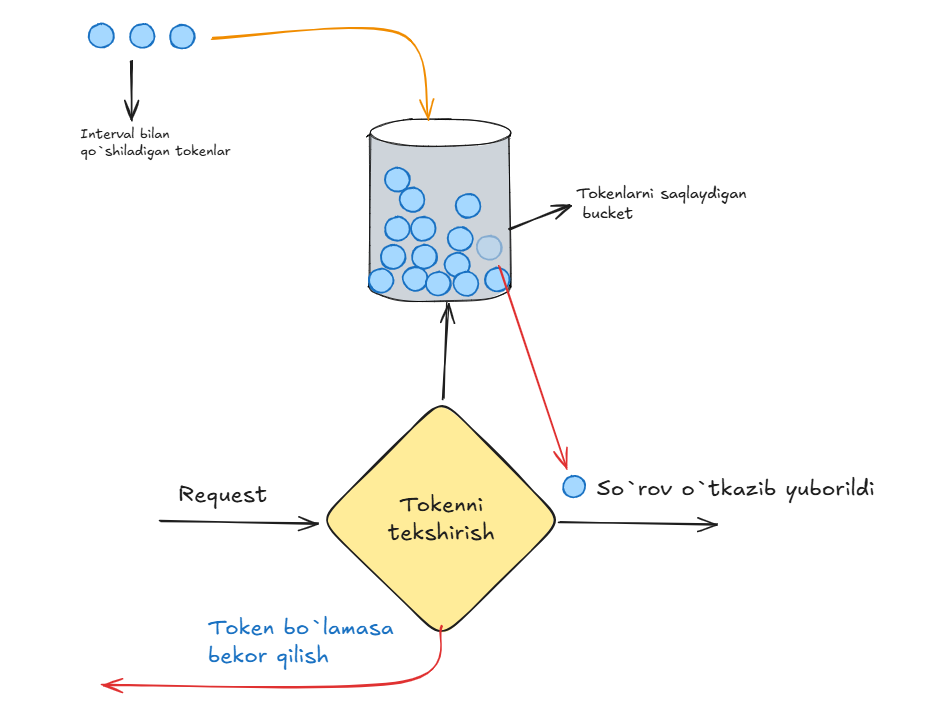
Rate limiter yozishni boshlaymiz
Bu algoritmi uchun bizga bucket uchun token sig'imi hamda interval bilan to'ldirilishi kerak bo'lgan tokenlar soni kerak bo'ladi. Bu uchun oddiy TokenBucket class yaratib olamiz :
class TokenBucket {
  constructor(capacity, refillRate) {
    this.capacity = capacity;
    this.refillRate = refillRate;
    this.tokens = capacity;
    this.lastRefillTimestamp = Date.now();
  }
}
lastRefillTimestamp bizga oxirgi marta token qachon to'ldirilganligini bildiradi.
Endo unga tokenni consumeqiladigan metod yozamiz va u so'rov qabul qilinsa true bo'lsa false qiymat qaytaradi :
consume() {
  if (this.tokens >= 1) {
    this.tokens -= 1;
    return true;
  }
  return false;
}
Endi refilltoken to'ldiradigan metod yozamiz va u har doim yangi so'rov kelganda tekshiriladi va kerak bo'lsa token qo'shiladi :
refill() {
  const now = Date.now();
  const elapsedTime = (now - this.lastRefillTimestamp) / 1000;
  const tokensToAdd = Math.floor(elapsedTime * this.refillRate);
  if (tokensToAdd > 0) {
    this.tokens = Math.min(this.capacity, this.tokens + tokensToAdd);
    this.lastRefillTimestamp = now;
  }
}
Qayta to'ldirish uslublari (lazy yoki periodic)
Shu yerda bizda refill uchun 2 ta tanlov mavjud har so'rov kelganda(lazy) tekshirish yoki har intervalda qayta to'ldirish (periodic)distributed sistemalarda odatda bu so'rov kelganda amalga oshiriladi chunki bu so'rov kelmagan payti bekordan bekorga resurs sarflashni oldini oladi . Siz har so'rovda tekshirish ham resurs oladi deyishingiz mumkin lekin bu operatsion sistema chaqiruvi (Date.now() va minus) va u tez ishlaydi. Chunki u hozir in-memory distributed sistemalarda bu shu serverlar turgan data senterdagi redis orqali markaziy counterda ushlab turiladi . Latency taxminan ~1ms har so'rovda qabul qilsak bo'ladi.
Endi bu classga bucketni hozirgi holatini oladigan metod qo'shamiz va butun class ishlashga tayyor :
class TokenBucket {
  constructor(capacity, refillRate) {
    this.capacity = capacity;
    this.refillRate = refillRate;
    this.tokens = capacity;
    this.lastRefillTimestamp = Date.now();
  }
  consume() {
    this.refill();
    if (this.tokens >= 1) {
      this.tokens -= 1;
      return true;
    }
    return false;
  }
  refill() {
    const now = Date.now();
    const elapsedTime = (now - this.lastRefillTimestamp) / 1000;
    const tokensToAdd = Math.floor(elapsedTime * this.refillRate);
    if (tokensToAdd > 0) {
      this.tokens = Math.min(this.capacity, this.tokens + tokensToAdd);
      this.lastRefillTimestamp = now;
    }
  }
  getCurrentState() {
    this.refill();
    return {
      tokens: this.tokens,
      capacity: this.capacity,
      lastRefillTimestamp: this.lastRefillTimestamp,
    };
  }
}
Xo'sh bizda limiter logikasi tugadi ammo bu faqat bitta bucket uchun biz har bir user uchun alohida bucket ochib undagi ma'lumotlarni saqlaydigan class yaratamiz bu hozirgi kodimizdan foydalaniladi va haqiqiy rate limiter bo'ladi.
Har bir user uchun bucket yaratish
Bu classni TokenBucketRateLimiter deb nomlaymiz va u bucketlarni o'z ichiga oladi va har yangi user kelganda yangi bucket yaratadi :
class TokenBucketRateLimiter {
  constructor(capacity, refillRate) {
    this.buckets = new Map();
    this.capacity = capacity;
    this.refillRate = refillRate;
  }
  getBucket(key) {
    if (!this.buckets.has(key)) {
      this.buckets.set(key, new TokenBucket(this.capacity, this.refillRate));
    }
    return this.buckets.get(key);
  }
  isAllowed(key) {
    const bucket = this.getBucket(key);
    return bucket.consume();
  }
  getCurrentState(key) {
    const bucket = this.getBucket(key);
    return bucket.getCurrentState();
  }
}
Endi buni serverga qo'yib tekshirib ko'rishimiz kerak .
serverda /token-bucket endpointga rate limiter sifatida ulaymiz.
const http = require("http");
const { TokenBucketRateLimiter } = require("./token-bucket/rate-limiter");
const rateLimiter = new TokenBucketRateLimiter(5, 1);
function rateLimiterMiddleware(req, res, next) {
  const userId = req.headers["x-user-id"] || "default-user";
  if (rateLimiter.isAllowed(userId)) {
    next();
  } else {
    res.writeHead(429, { "Content-Type": "application/json" });
    res.end(
      JSON.stringify({
        message: "So'rov rad etildi - limit oshib ketdi",
        state: rateLimiter.getCurrentState(userId),
      }),
    );
  }
}
function handleRequest(req, res) {
  if (req.url === "/token-bucket") {
    const userId = req.headers["x-user-id"] || "default-user";
    rateLimiterMiddleware(req, res, () => {
      res.writeHead(200, { "Content-Type": "application/json" });
      res.end(
        JSON.stringify({
          message: "So'rov qabul qilindi",
          state: rateLimiter.getCurrentState(userId),
        }),
      );
    });
  } else {
    res.writeHead(404, { "Content-Type": "application/json" });
    res.end(JSON.stringify({ message: "Not found" }));
  }
}
const server = http.createServer(handleRequest);
server.listen(3000, () => {
  console.log("Server 3000-portda ishga tushdi...");
});
endi shu urlga har xil userlar sifatida so'rovlar yuborib ishlayaptimi yoqmi tekshirib ko'ramiz bu uchun foydalanuvchilarni mocklaydigan script yozamiz :
const http = require("http");
const SERVER_URL = "http://localhost:3000/token-bucket";
const CAPACITY = 5;
const REFILL_RATE = 1;
const WAIT_MS = 3000;
function sendRequest(userId) {
  return new Promise((resolve) => {
    const options = {
      headers: { "x-user-id": userId },
    };
    http
      .get(SERVER_URL, options, (res) => {
        let raw = "";
        res.on("data", (chunk) => (raw += chunk));
        res.on("end", () => {
          resolve({ status: res.statusCode, body: JSON.parse(raw) });
        });
      })
      .on("error", (err) => {
        resolve({ status: null, error: err.message });
      });
  });
}
async function simulateUser(userId, count) {
  const log = { userId, accepted: [], rejected: [] };
  for (let i = 1; i <= count; i++) {
    const { status } = await sendRequest(userId);
    if (status === 200) {
      log.accepted.push(i);
    } else {
      log.rejected.push(i);
    }
  }
  return log;
}
(async () => {
  const USERS = ["alice", "bob", "charlie"];
  const REQUESTS_PER_USER = 8;
  console.log(`${"─".repeat(55)}`);
  console.log(` Token-Bucket Server Test`);
  console.log(
    ` Capacity: ${CAPACITY} tokens | Refill: ${REFILL_RATE} token/sec`,
  );
  console.log(` Each user sends ${REQUESTS_PER_USER} rapid requests`);
  console.log(`${"─".repeat(55)}\n`);
  console.log("Phase 1 — Burst requests (all users simultaneously)\n");
  const results = await Promise.all(
    USERS.map((userId) => simulateUser(userId, REQUESTS_PER_USER)),
  );
  for (const log of results) {
    console.log(` User: ${log.userId}`);
    console.log(` Accepted on requests : [${log.accepted.join(", ")}]`);
    console.log(` Rejected on requests : [${log.rejected.join(", ")}]`);
    console.log(
      ` Summary : ${log.accepted.length} accepted, ${log.rejected.length} rejected\n`,
    );
  }
  const refillTokens = Math.min(
    CAPACITY,
    Math.floor((WAIT_MS / 1000) * REFILL_RATE),
  );
  console.log(
    `Phase 2 — Waiting ${WAIT_MS / 1000}s for ~${refillTokens} token(s) to refill...\n`,
  );
  await new Promise((resolve) => setTimeout(resolve, WAIT_MS));
  for (const user of USERS) {
    const retryLog = await simulateUser(user, refillTokens);
    console.log(` User: ${user} (after wait)`);
    console.log(` Accepted on requests : [${retryLog.accepted.join(", ")}]`);
    console.log(` Rejected on requests : [${retryLog.rejected.join(", ")}]`);
    console.log(
      ` Summary : ${retryLog.accepted.length} accepted, ${retryLog.rejected.length} rejected\n`,
    );
  }
  console.log(`${"─".repeat(55)}`);
  console.log(" Done.");
})();
Endi buni tekshirib ko'ramiz :
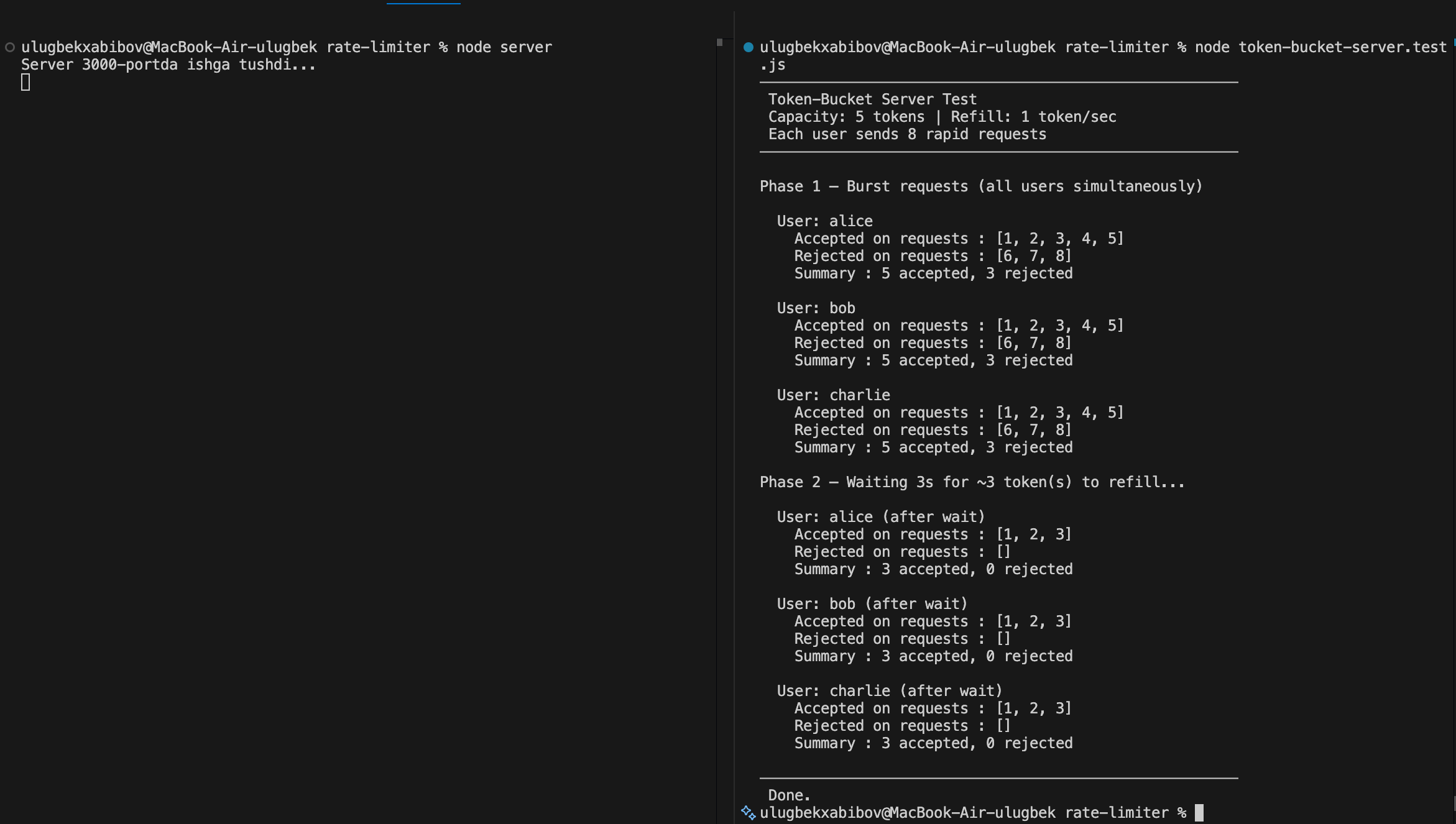
Ko'rib turganingizdek algoritm ishlamoqda va burst trafikga imkon bermoqda va keyin bir xil rate bo'yicha tokenlar to'lib so'rovlarga yo'l ochilmoqda.
Xulosa
Xulosa qilib aytganda rate limiting implimentatsiya qilayotganda dasturning kattaligi , va sizga keladigan so'rovlar uslubini bilishingiz kerak. Kerakli so'rovlarni bekor qilmaslik uchun. Hozirgi implimentatsiya bu juda oddiy ammo algoritmni to'liq tushunishga yordam beradi.
Bunda tashqari har doim foydalanuvchilar bilan rete limit haqidagi ma'lumotlarni berish , va bu orqali ular o'zlariga mos qayta urinib ko'rishlari mumkin.