Bloom filter amalda: Node.jsda noldan yozib benchmark qilamiz
Assalamu Alaykum bugunbloom filterni Javascript(Nodejs)da qurib ko'ramiz va uni 1 million ma'lumot bilan to'ldirib benchmark orqali bizga peroformanceni qancha ko'tarishini ko'rib chiqamiz.
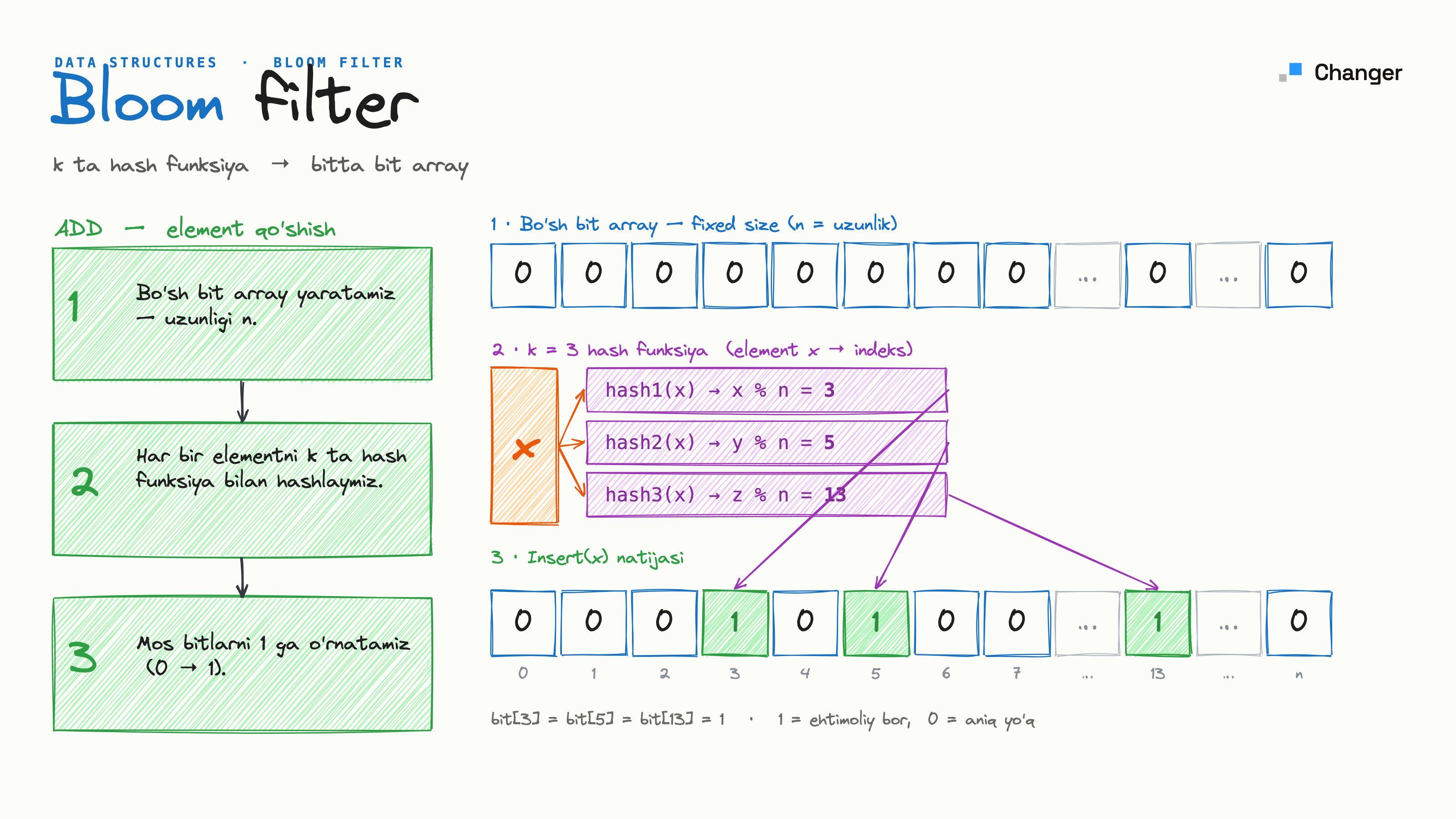
Bloom filterni bilmaganlar uchun ushbu maqolamni tavsiya qilaman. Bloom filter
Unda qani boshladik :)
Bloom filterni qurish
Birinchi oddiy class va o'zgaruvchilarni yaratishdan boshlaymiz :
class BloomFilter {
  constructor(expectedItems, falsePositiveRate) {
    this.n = expectedItems;
    this.p = falsePositiveRate;
  }
}
Xo'sh bloom filter 2 qiymatni qabul qiladi expectedItems kutilayotgan ma'lumot soni , falsePositiveRate necha foiz bloom filter xato qilishi mumkinligi(yoq ma'lumotni bor deb aytish).
Endi formulalar orqali bit Array hajmini hash funksiyalar sonini aniqlab olamiz. Pastdagi rasmda formulalarni ko'rishingiz mumkin.
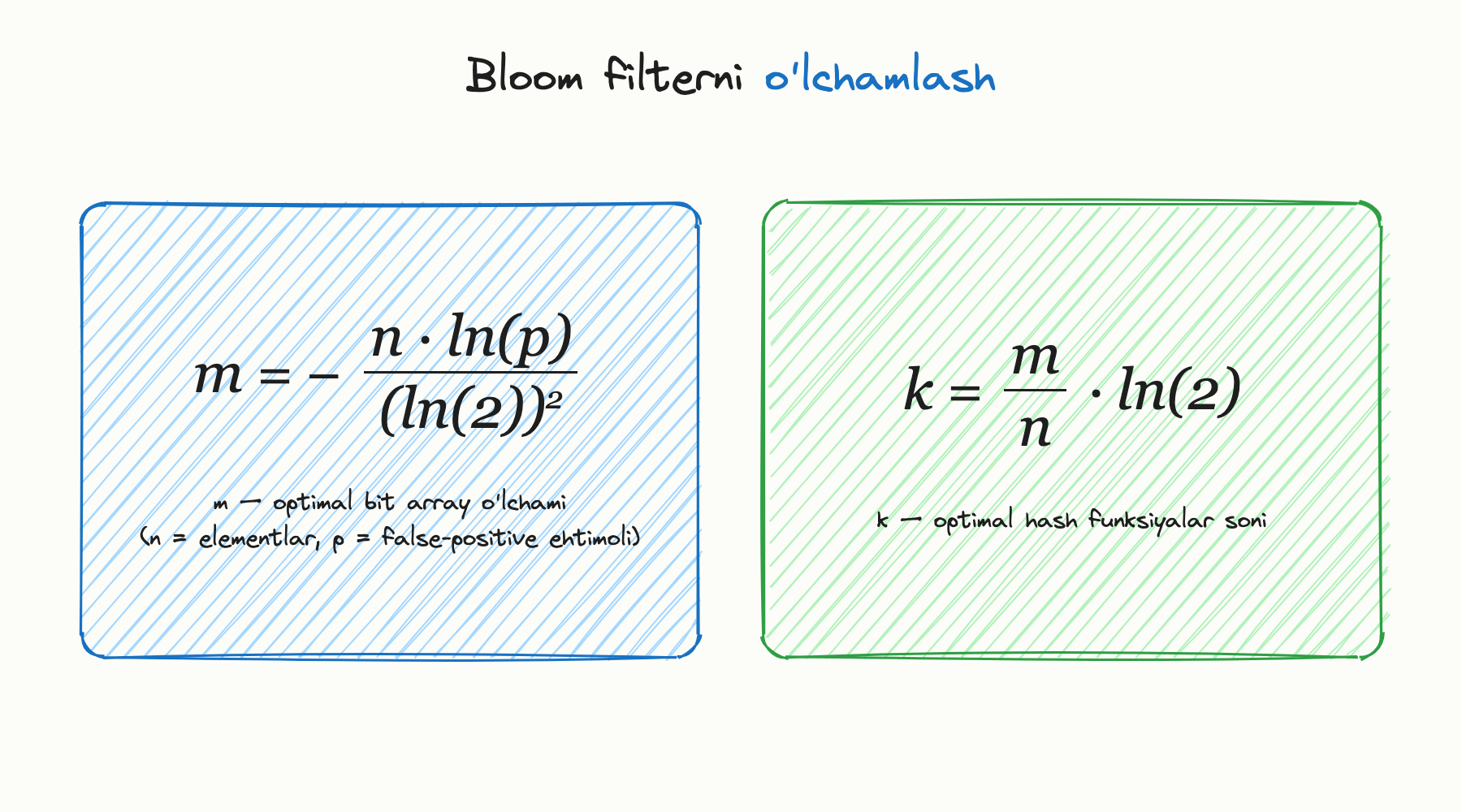
m= > optimal bitlar sonik= > optimal hash funksiyalar sonin=> kutilayotgan ma'lumot sonip= > necha foiz bloom filter xato qilishi mumkinligi
Ushbu formulalarni classga qo'shamiz :
class BloomFilter {
  constructor(expectedItems, falsePositiveRate) {
    this.n = expectedItems;
    this.p = falsePositiveRate;
    this.m = this._optimalSize();
    this.k = this._optimalHashCount();
    this.bitArray = new Array(this.m).fill(0);
  }
  _optimalSize() {
    return Math.ceil(-(this.n * Math.log(this.p)) / Math.log(2) ** 2);
  }
  _optimalHashCount() {
    return Math.ceil((this.m / this.n) * Math.log(2));
  }
}
Endi hash funsiya yozib olamiz :
const crypto = require("crypto");
function simpleCryptoHash(str, seed = "") {
  const hash = crypto.createHash("sha256");
  hash.update(seed + str);
  const digest = hash.digest();
  return digest.readUInt32BE(0);
}
module.exports = { simpleCryptoHash };
Endi qo'shish(add) va tekshirish(contain) funksiyalarini qo'shamiz (qo'shimcha bir 2 ta funksiyalar ham ):
const { simpleCryptoHash } = require("./hash-function");
class BloomFilter {
  constructor(expectedItems, falsePositiveRate) {
    this.n = expectedItems;
    this.p = falsePositiveRate;
    this.m = this._optimalSize();
    this.k = this._optimalHashCount();
    this.bitArray = new Array(this.m).fill(0);
  }
  _optimalSize() {
    return Math.ceil(-(this.n * Math.log(this.p)) / Math.log(2) ** 2);
  }
  _optimalHashCount() {
    return Math.ceil((this.m / this.n) * Math.log(2));
  }
  _setBit(pos) {
    this.bitArray[pos] = 1;
  }
  _getBit(pos) {
    return this.bitArray[pos] === 1;
  }
  _getHashes(item) {
    const hashes = [];
    for (let i = 0; i < this.k; i++) {
      const hashVal = simpleCryptoHash(item, i.toString());
      hashes.push(hashVal % this.m);
    }
    return hashes;
  }
  add(item) {
    const positions = this._getHashes(item);
    positions.forEach((pos) => {
      this._setBit(pos);
    });
  }
  contains(item) {
    const hashes = this._getHashes(item);
    for (let pos of hashes) {
      if (!this._getBit(pos)) {
        return false;
      }
    }
    return true;
  }
}
module.exports = { BloomFilter };
Endi bir server yaratib olamiz va uni doimgidek dockerdagi postgres ga ulaymiz
docker run --name bloom-filter -p 20000:5432 -d -e POSTGRES_PASSWORD=postgres postgres:latest //container yaratish va ishga tushirish
docker exec -it bloom-filter psql -U postgres //postgresga kirish uchun
Server kodlari :
const http = require("http");
const { Pool } = require("pg");
const { URL } = require("url");
const { BloomFilter } = require("./bloom-filter");
const pool = new Pool({
  user: "postgres",
  host: "localhost",
  database: "postgres",
  password: "postgres",
  port: 20000,
});
const bloom = new BloomFilter(1000000, 0.01);
async function loadUsernamesIntoBloom() {
  try {
    const result = await pool.query("SELECT name FROM students");
    result.rows.forEach((row) => bloom.add(row.name));
    console.log(`Loaded ${result.rowCount} usernames into Bloom filter`);
  } catch (err) {
    console.error("Error loading usernames:", err);
  }
}
loadUsernamesIntoBloom();
const server = http.createServer(async (req, res) => {
  const url = new URL(req.url, `http://${req.headers.host}`);
  const pathname = url.pathname;
  const method = req.method;
  if (method === "GET" && pathname === "/search") {
    const username = url.searchParams.get("username");
    if (!username) {
      res.writeHead(400, { "Content-Type": "application/json" });
      res.end(
        JSON.stringify({ error: "Username query parameter is required" }),
      );
      return;
    }
    try {
      const result = await pool.query(
        "SELECT 1 FROM students WHERE name=$1 LIMIT 1",
        [username],
      );
      res.writeHead(200, { "Content-Type": "application/json" });
      res.end(JSON.stringify({ exists: result.rowCount > 0 }));
    } catch (err) {
      console.error(err);
      res.writeHead(500, { "Content-Type": "application/json" });
      res.end(JSON.stringify({ error: "Internal Server Error" }));
    }
  } else if (method === "GET" && pathname === "/search-bloom") {
    const username = url.searchParams.get("username");
    if (!username) {
      res.writeHead(400, { "Content-Type": "application/json" });
      res.end(
        JSON.stringify({ error: "Username query parameter is required" }),
      );
      return;
    }
    const exists = bloom.contains(username);
    res.writeHead(200, { "Content-Type": "application/json" });
    res.end(JSON.stringify({ exists }));
  } else {
    res.writeHead(404, { "Content-Type": "application/json" });
    res.end(JSON.stringify({ error: "Not found" }));
  }
});
server.listen(3000, () => {
  console.log("Server listening on port 3000");
});
Server student jadvalidan nomlarini olib bloomfilterni server yonganda paytda to'ldiradi va uni tayyor holatga olib keladi . Databazani script bilan to'ldirib olamiz, kodni ushbu repostoridan topishingiz mumkin (nodejsda). Repostory
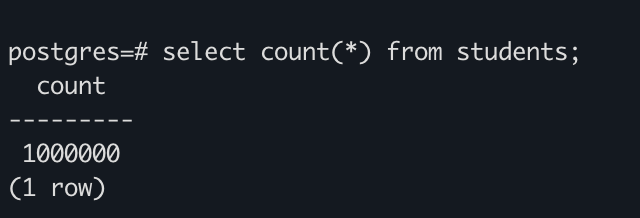
1 million ma'lumot joylandi endi serverni 2 API uchun benchmark qilishimiz kerak. Bu uchun autocannondan foydalanamiz (har xil usernamelar orqali so'rovlar uzatamiz):
const autocannon = require("autocannon");
const usernames = [
  "Magdalena",
  "Victor",
  "Kate",
  "Vohid",
  "Nozim",
  "John",
  "Jane",
  "Alice",
  "Bob",
  "Charlie",
  "David",
  "Eve",
  "Frank",
];
let counter = 0;
function urlGenerator() {
  const username = usernames[counter % usernames.length];
  counter++;
  return `/search-bloom?username=${username}`;
}
const instance = autocannon({
  url: "http://localhost:3000",
  connections: 10,
  duration: 10,
  requests: [
    {
      method: "GET",
      setupRequest: (req) => {
        req.path = urlGenerator();
        return req;
      },
    },
  ],
});
autocannon.track(instance);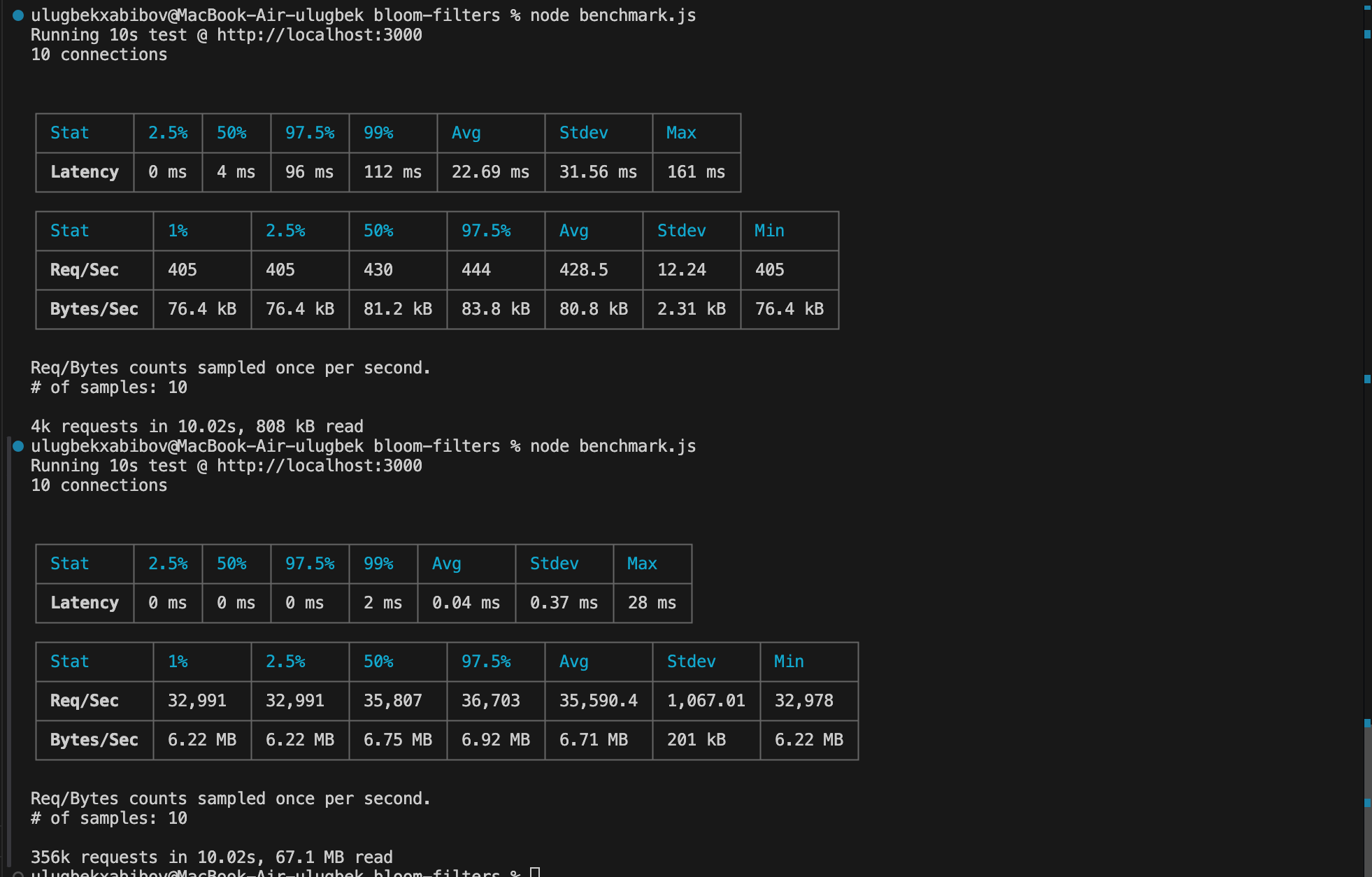
Ko'rib turganingizdek o'rtacha vaqt 22.6 ms dan 0.04msga tushgan o'rtacha requestlar soni ham 430 tadan 35590tagacha sekundiga osgan . Search ancha tez ishlashni boshladi .
Hamma kodlarni buyerdan topishingiz mumkin. Link
Xulosa
Xulosa qilib aytadigan bo'lsak to'g'ri raqamlar tanlansa hamda xotirada kerakli joy bo'lsa. Ma'lumot yoqligini ishonch bilan aytish uchunbloom filterdan foydalanish performanceni ancha oshiradi.