Connection pooling nima? Benchmark bilan
Assalamu Alaykum bugun databazada connection pooling orqali request-response vaqtini qanday kamaytirish mumkinligi misollar bilan ko'rib chiqamiz.
Connection pooling nimaga kerak ?
Connection pooling qachonki bizdagi TCP connection yaratish qimmatga tushsa yoki serverda databaza connection uchun chegaralangan joy bo'lsa ishlatishga qulay , connection pooling bu muammolar yechishga yordam beradi.
Ko'p hollarda request response qanday ishlaydi siz GET so'rovini yuborasiz u serverga boradi va server databaza bilan aloqa o'rnatib natijani oladi va aloqani uzib sizga natijani qaytaradi. Xuddi shu yerda TCP aloqa o'rnatish ko'p vaqt talab qiladi . Buni ushbu maqolalardan bilib olishingiz mumkin.
Tepadagi usulda yana bir boshqa usul ham mavjud bu bir necha aloqalar(connection) o'rnatib uni saqlab turish va query uzatish kerak bo'lganda shulardan birortasi orqali uzatish. Bu usul Databaza connection pooling deyiladi va xuddi Thread poolga o'xshaydi.
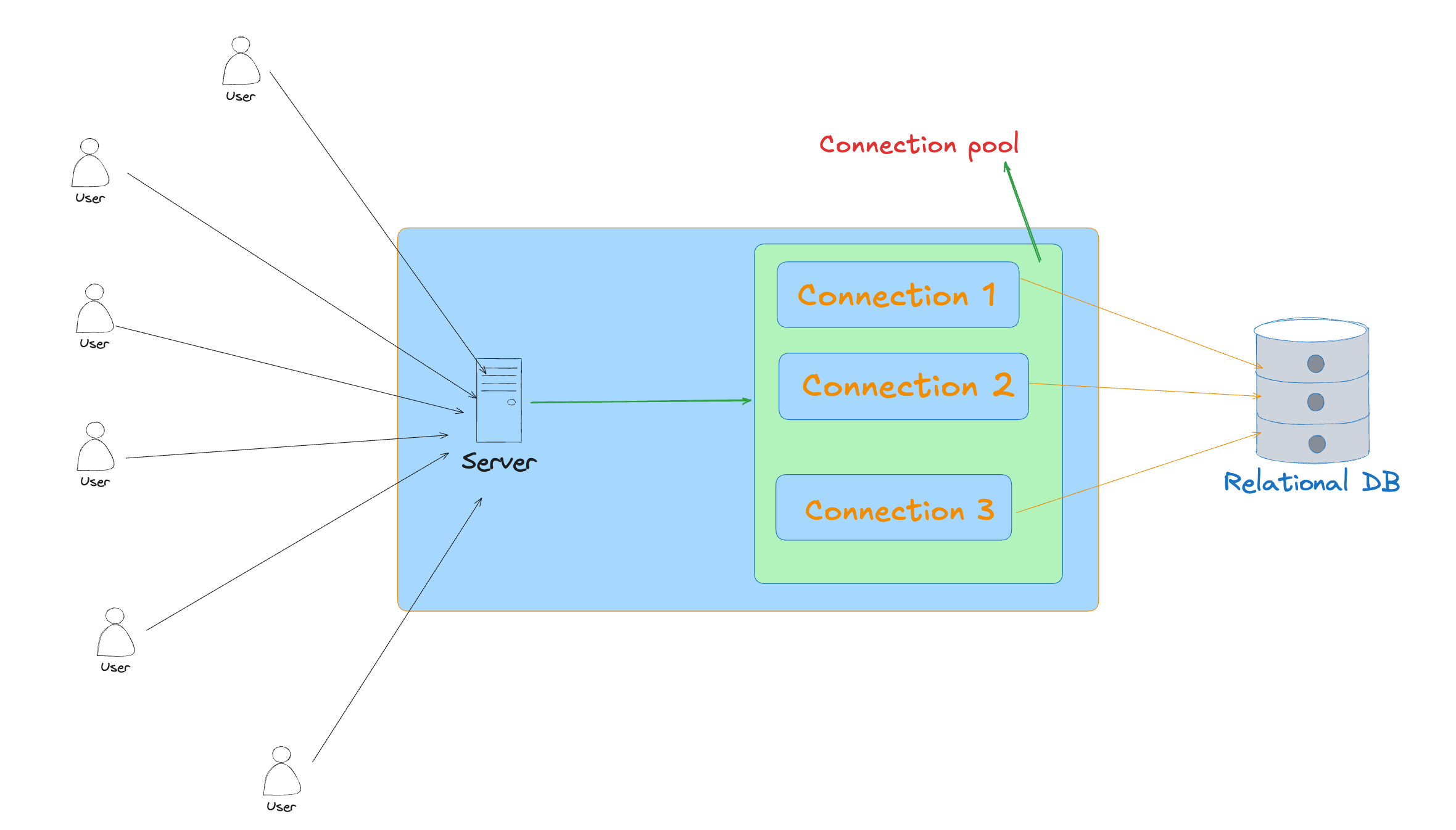
Endi querylar tezroq bo'ladi chunki aloqa allaqachon o'rnatilgan va natijani qaytarsa bo'ldi.
Misol
Buni misollarda ko'ramiz va bu uchun bir dockerda postgres databazani ko'tarib olamiz .
docker run --name connection-pool -p 20000:5432 -d -e POSTGRES_PASSWORD=postgres postgres:latest //container yaratish va ishga tushirish
docker exec -it connection-pool psql -U postgres //postgresga kirish uchun
Va ushbu scriptdan foydalangan holda , 10 million qator ma'lumotni ushbu bazaga joylaymiz. Kodni ushbu repostoridan topishingiz mumkin (nodejsda) . Repo
Endi Nodejsda bir oddiy API quramiz ushbu ma'lumotlarni olish uchun .
const http = require("http");
const { Client } = require("pg");
const client = new Client({
  user: "postgres",
  host: "localhost",
  database: "postgres",
  password: "postgres",
  port: 20000,
});
client.connect();
const server = http.createServer(async (req, res) => {
  if (req.method === "GET" && req.url === "/students") {
    try {
      const result = await client.query("SELECT * FROM students LIMIT 1000");
      const users = result.rows;
      res.writeHead(200, { "Content-Type": "application/json" });
      res.end(JSON.stringify(users));
    } catch (err) {
      console.error("Query error:", err);
      res.writeHead(500, { "Content-Type": "application/json" });
      res.end(JSON.stringify({ error: "Internal Server Error" }));
    }
  } else {
    res.writeHead(404, { "Content-Type": "application/json" });
    res.end(JSON.stringify({ error: "Not Found" }));
  }
});
const PORT = 3000;
server.listen(PORT, () => {
  console.log(`Server running on port ${PORT}`);
});
buni ishlatib ko'rgandan so'ng xuddi shu apiga o'xshash ammo pooling bilan databazaga bog'lanadigan server yaratamiz.
const http = require("http");
const { Pool } = require("pg");
const pool = new Pool({
  user: "postgres",
  host: "localhost",
  database: "postgres",
  password: "postgres",
  port: 20000,
  max: 20, // Maximum number of clients in the pool
  idleTimeoutMillis: 30000, // Close idle clients after 30 seconds
  connectionTimeoutMillis: 2000, // Return an error after 2 seconds if connection cannot be established
});
const server = http.createServer(async (req, res) => {
  if (req.method === "GET" && req.url === "/students") {
    try {
      const result = await pool.query("SELECT * FROM students LIMIT 1000");
      const users = result.rows;
      res.writeHead(200, { "Content-Type": "application/json" });
      res.end(JSON.stringify(users));
    } catch (err) {
      console.error("Query error:", err);
      res.writeHead(500, { "Content-Type": "application/json" });
      res.end(JSON.stringify({ error: "Internal Server Error" }));
    }
  } else {
    res.writeHead(404, { "Content-Type": "application/json" });
    res.end(JSON.stringify({ error: "Not Found" }));
  }
});
const PORT = 3001;
server.listen(PORT, () => {
  console.log(`Server running on port ${PORT}`);
});
Ko'rib turganingizdek 2-apida Client classi o'rniga Pool classi foydalanilgan va u qo'shimcha qiymatlar oladi, max maksimal aloqalar soni uchun, connectionTimeoutMillis bu agar shu vaqt ichida aloqa o'rnatilmasa xatolik qaytarish uchun timeout, idleTimeoutMillisbu agar aloqa shuncha vaqt ichida qayta ishlatilinmasa uni avtomatik tarzda yopish chunki u databaza connection band qiladi hamda u uchun xotira ham ketadi.
Endi 2 ta server ham ishlamoqda endi ularni benchmark qilish orqali so'rovga javob vaqti o'zgaradimi yoqmi tekshirib ko'ramiz.
Benchmarking
Benchmark uchun autocannon dan foydalanamiz .
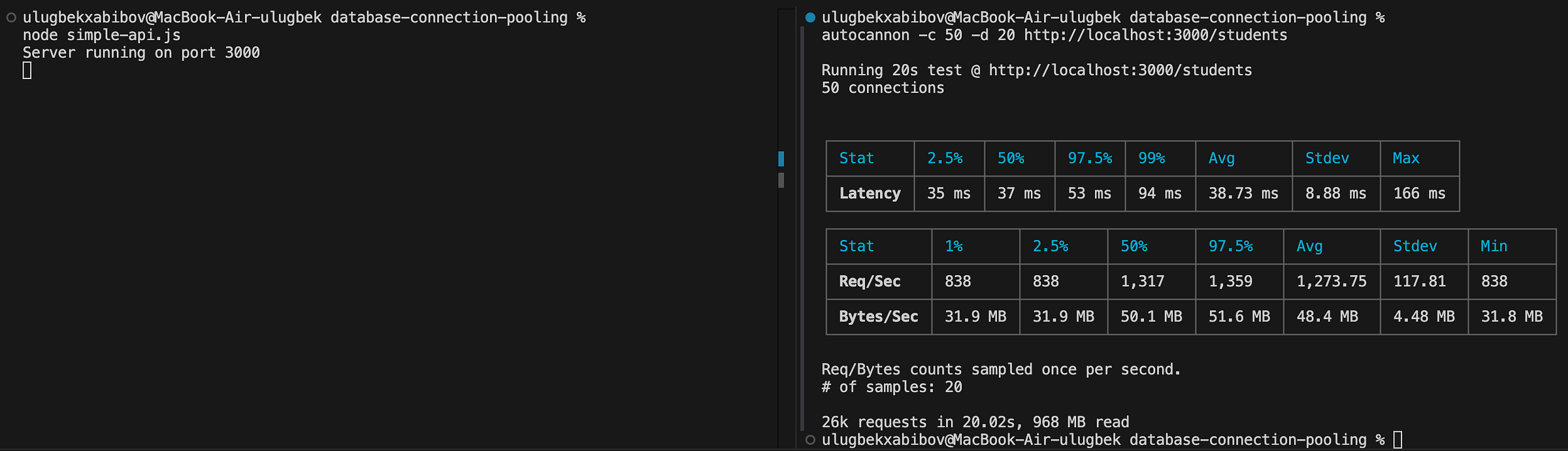
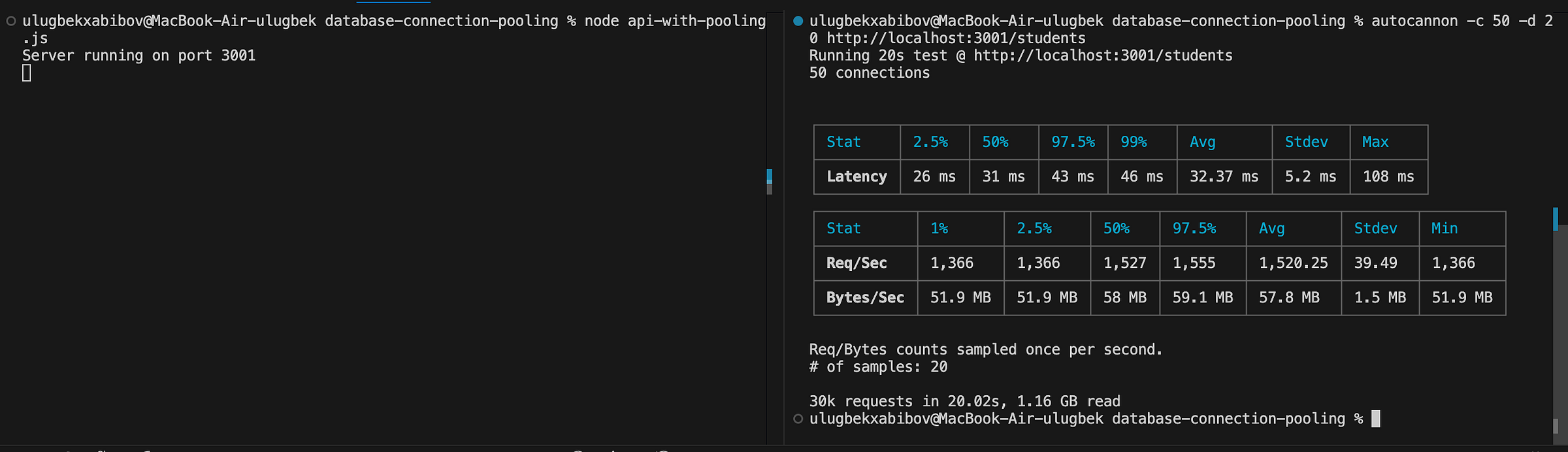
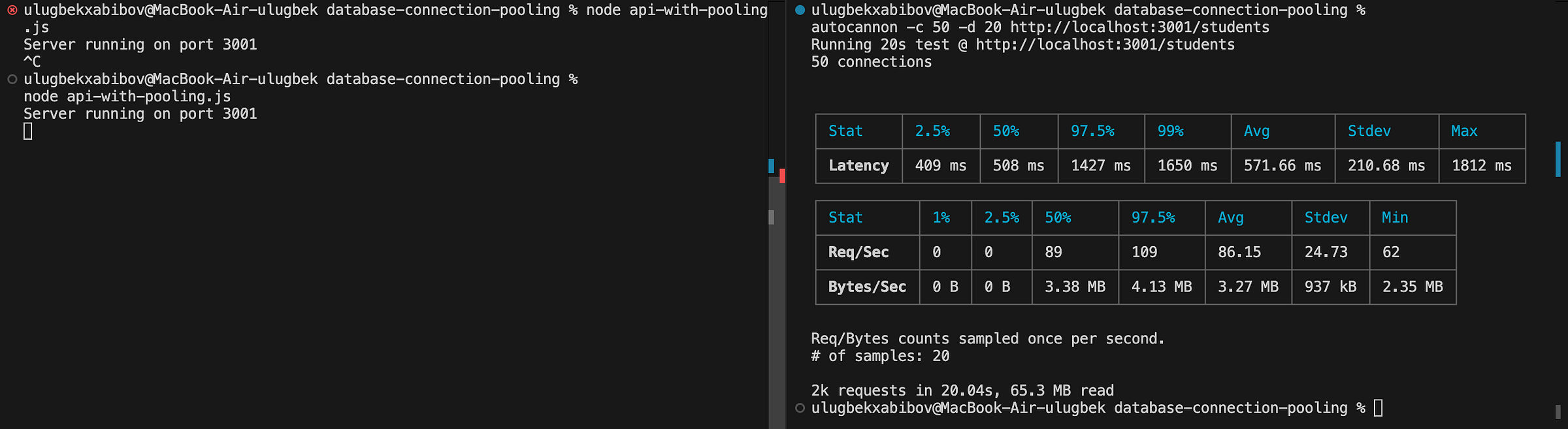
Tepada ko'rib turganingizdek pooling bilan benchmarkda o'rtacha vaqt hamda umumiy so'rovlar soni bo'yicha yaxshiroq natija chiqdi. Bu unchalik katta emas lekin sezilarli . Bundan tashqari bulocal networkligi uchun ham databaza bilan bog'lanish tezroq bo'ladi.
Qani unda biror remote databazada ham benchmark qilamiz. Men ushbu saytda foydalandim . https://neon.tech/
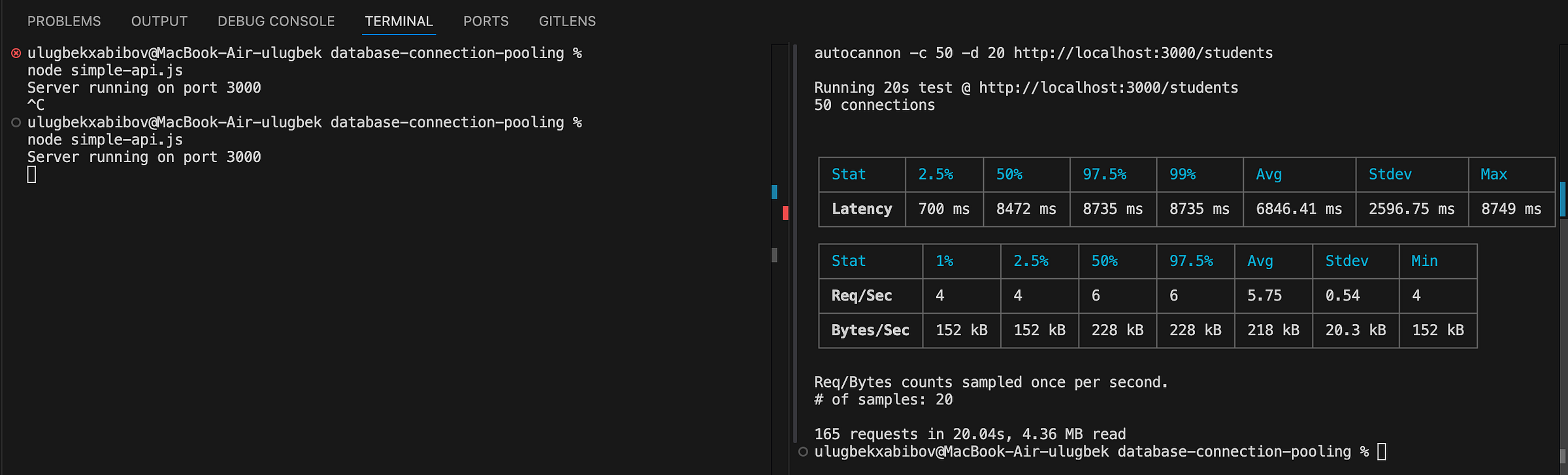
Ko'rib turganingizdek remote databaza pooling benchmarklari bir necha marotaba yaxshi chiqdi. O'rtacha vaqt bo'yicha 11 marta yaxshiroq , umumiy javob berilgan so'rovlar bo'yich taxminan 13 marta . Bu ancha foyda berganini ko'rishimiz mumkin.
Agarda siz ACID (transaction) uchun ishlatmoqchi bo'lsangiz hamma queryni alohida uzatish yaxshi emas , chunki ular har xil connectionda run bo'lishi kerak emas , shuning uchun pooldan transaction uchun alohida client so'rab olish mumkin.
const http = require("http");
const { Pool } = require("pg");
const pool = new Pool({
  user: "postgres",
  host: "localhost",
  database: "postgres",
  password: "postgres",
  port: 20000,
  max: 10,
  idleTimeoutMillis: 30000,
});
const server = http.createServer(async (req, res) => {
  if (req.method === "GET" && req.url === "/students") {
    const client = await pool.connect();
    try {
      await client.query("BEGIN");
      const result = await client.query("SELECT * FROM students LIMIT 1000");
      const students = result.rows;
      await client.query("COMMIT");
      res.writeHead(200, { "Content-Type": "application/json" });
      res.end(JSON.stringify(students));
    } catch (err) {
      console.error("Transaction error:", err);
      try {
        await client.query("ROLLBACK");
      } catch (rollbackErr) {
        console.error("Rollback error:", rollbackErr);
      }
      res.writeHead(500, { "Content-Type": "application/json" });
      res.end(JSON.stringify({ error: "Internal Server Error" }));
    } finally {
      client.release();
    }
  } else {
    res.writeHead(404, { "Content-Type": "application/json" });
    res.end(JSON.stringify({ error: "Not Found" }));
  }
});
const PORT = 3000;
server.listen(PORT, () => {
  console.log(`Server running on port ${PORT}`);
});
Maksimal aloqalar sonini qanday bilamiz ?
Bu yerda connectionlar soni uchun aniq bir raqam yo'q bu sizning dasturga bog'liq holda tanlanadi.
Ko'p aloqa(connection) bu degani ko'p requestlarga javob bera olasiz , ammo bu databazada concurrencyga sabab bo'lib locklar tufayli performance tushishi mumkin.
Kam aloqa(connection) da esa so'rovlar navbatga tushadi ammo querylar tez bo'lishi mumkin lockga tushmaganligi tufayli .
Barcha kodlarni bu yerdan topishingiz mumkin.Repo
Xulosa
Xulosa qilib aytadigan bo'lsak agar sizning dasturda har bir queryda databazaga bog'lanish ko'p vaqt olayotgan bo'lsa va bu performancega ta’sir qilayotgan bo'lsa unda connection poolorqali uni yaxshilash mumkin. Ammo undagi aloqalar sonini tanlash juda muhim noto'g'ri raqam performanceni bundanda yomonlashtirishi mumkin.